GA4 shows what happens on your website. Your CRM tracks leads and customers. Ad platforms report conversions. Your e-commerce platform records purchases. Your marketing automation tool manages email engagement. Each system holds part of the picture, but none provides a complete view on its own.
Stitching all of this together is what “Google Analytics integrations” actually means – and the right answer depends entirely on which systems you’re trying to connect.
This guide covers 14 categories of GA4 integrations and organizes them by purpose rather than vendor. Some integrations are available with a few clicks, particularly within Google’s ecosystem. Others, such as CRM and revenue attribution integrations, require more setup and ongoing maintenance. Each category solves a different problem and comes with different implementation requirements.
By understanding how these integrations fit together, you can turn GA4 from a website analytics platform into a central reporting layer that connects marketing, sales, and revenue data across your business.
Let’s start with the overall landscape, then look at each integration category in detail.
The GA4 integration landscape at a glance
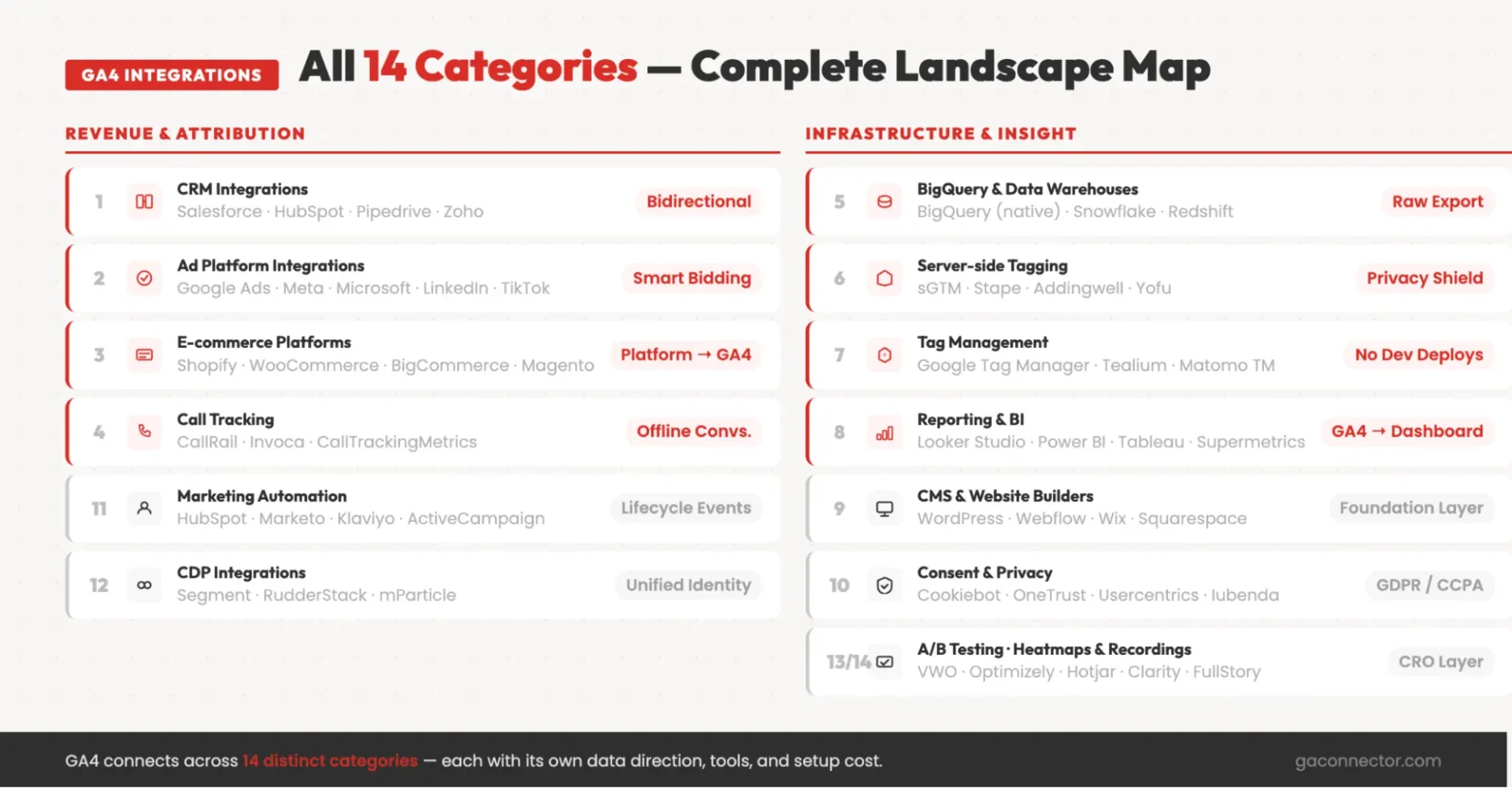
Before the deep-dives, here’s the full landscape. Scan the table, identify the category you need, and jump to the relevant section.
| Category | What it solves | Data flow direction | Example tools |
|---|---|---|---|
| CRM integrations | Closed-loop revenue attribution – ties GA4 sessions to real CRM deals | Bidirectional | Salesforce, HubSpot, Pipedrive, Zoho, Microsoft Dynamics |
| Ad platforms | Smart Bidding on real conversions; cross-platform attribution | Bidirectional | Google Ads, Meta, Microsoft Ads, LinkedIn Ads, TikTok Ads |
| E-commerce platforms | Purchase events, item-level revenue, checkout funnel tracking | Platform → GA4 | Shopify, WooCommerce, BigCommerce, Magento |
| Call tracking | Offline phone-call conversions tied to web sessions | Tool → GA4 | CallRail, Invoca, CallTrackingMetrics |
| BigQuery & data warehouses | Raw event-level export for custom analysis and joins | GA4 → warehouse | BigQuery (native), Snowflake, Redshift (via ETL) |
| Server-side tagging | Privacy-resilient tracking that survives iOS/ad blockers | Server → GA4 | sGTM, Stape, Addingwell, Yofu |
| Tag management | Centralized tag deployment without code changes | Site → GA4 | Google Tag Manager, Tealium, Matomo Tag Manager |
| Reporting & BI | Custom dashboards beyond GA4’s built-in reports | GA4 → BI tool | Looker Studio, Power BI, Tableau, Supermetrics |
| CMS & website builders | Baseline GA4 install via plugin or native field | CMS → GA4 | WordPress, Webflow, Wix, Squarespace, HubSpot CMS |
| Consent & privacy | GDPR/CCPA-compliant data capture with Consent Mode v2 | CMP → GA4 | Cookiebot, OneTrust, Iubenda, Usercentrics |
| Marketing automation | Lifecycle event tracking and lead-nurture attribution | Tool ↔ GA4 | HubSpot, Marketo, ActiveCampaign, Mailchimp, Klaviyo |
| CDPs | Unified customer identity across channels | Bidirectional | Segment, RudderStack, mParticle |
| A/B testing & CRO | Connect experiment exposure to GA4 outcomes | Tool ↔ GA4 | VWO, Optimizely, AB Tasty, Convert |
| Heatmaps & session recording | Behavioral context for GA4 metrics | GA4 ↔ tool | Hotjar, Microsoft Clarity, FullStory, Mouseflow |
Before diving into the categories, there are two important things to keep in mind.
The same tool can appear in multiple categories. HubSpot, for example, can act as a CRM, CMS, and marketing automation platform. Shopify is primarily an e-commerce platform but also functions as a CMS. The categories in this guide describe the purpose of the integration, not the software itself. Connecting HubSpot as a CRM requires a very different setup than connecting HubSpot as a CMS, even though it’s the same platform.
Not every integration category matters equally. The right priorities depend on your business model. A B2B company with a sales team and long buying cycles will usually get the most value from CRM and revenue attribution integrations. An e-commerce business will typically focus on purchase tracking, server-side tracking, and advertising platform integrations. The integrations that deserve your attention are the ones that help answer your most important business questions and produce the data you need to make better decisions.
The decision framework later in this guide will help match each business type with the integration categories that provide the greatest value.
How GA4 integrations actually work – the 8 methods
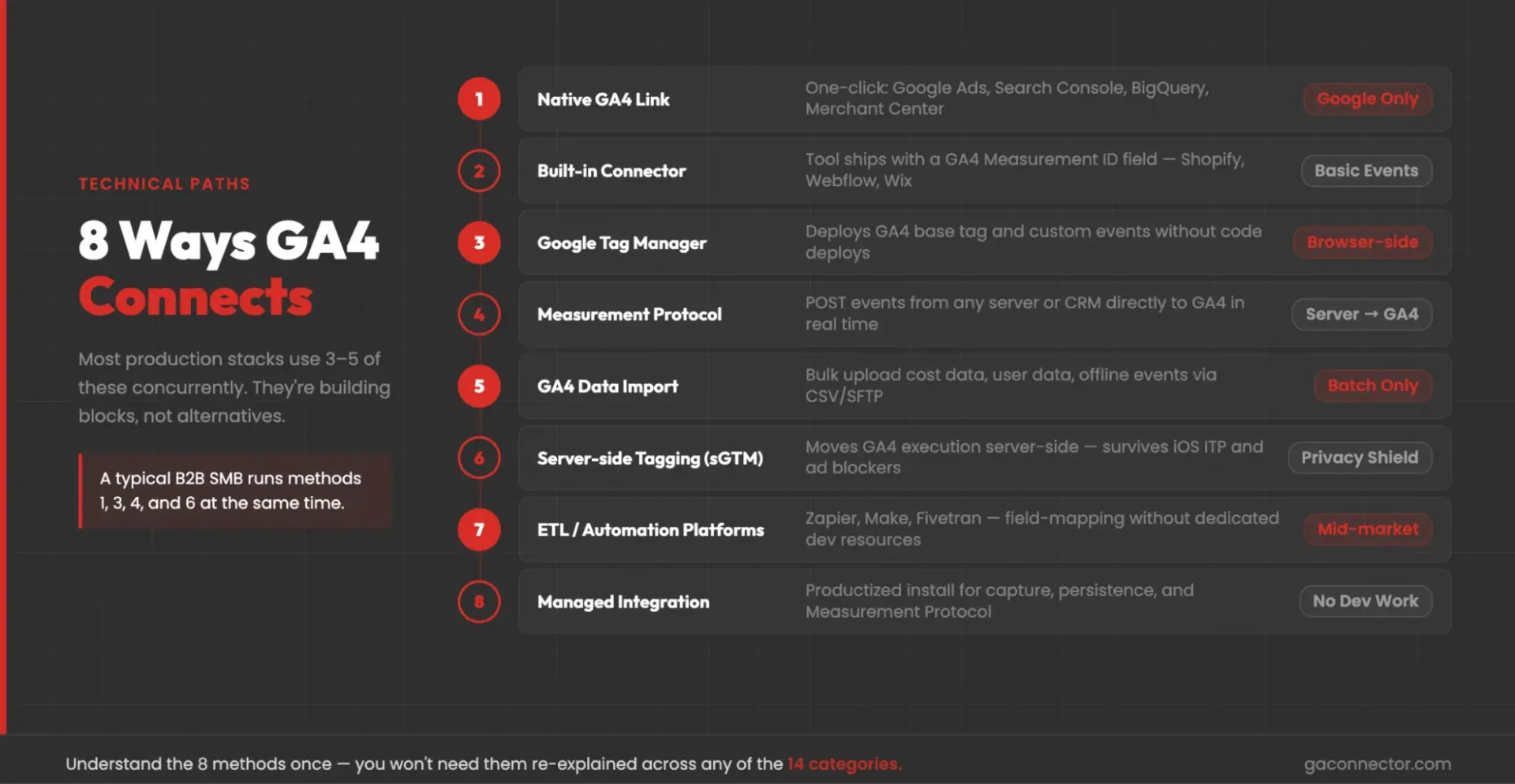
Before looking at each integration category, it helps to understand the underlying connection methods. Most GA4 integrations rely on a small set of technical approaches, and the same methods appear repeatedly across different tools and platforms.
The 14 integration categories covered in this guide are built on eight core integration methods. Understanding these methods upfront makes it much easier to evaluate the options in each category and choose the right setup for your business.
| Method | What it does | Best for | Limitations |
|---|---|---|---|
| 1. Native GA4 link (Admin → Product Links) | Google’s one-click links: Google Ads, Search Console, BigQuery, Merchant Center, DV360, SA360, Campaign Manager 360 | Anything inside Google’s ecosystem | Limited to Google products |
| 2. Built-in connector in the third-party tool | The tool ships with a GA4 Measurement ID field (Shopify, HubSpot CMS, Webflow, Wix, etc.) | CMSs and e-commerce platforms | Usually sends pageviews and basic events only |
| 3. Google Tag Manager | Deploys the GA4 base tag plus custom event tags from any source | Sites with multiple tracking needs | Browser-side only – use sGTM for resilience |
| 4. Measurement Protocol (server-to-server) | POST events from any server or CRM directly to GA4 | CRM events, offline conversions, deal stages | Requires dev work; needs client_id for session stitching |
| 5. GA4 Data Import (CSV/SFTP) | Bulk upload of cost data, user data, item data, offline events | Historical loads and daily batch enrichment | Not real-time |
| 6. Server-side tagging (sGTM) | Moves GA4 tag execution server-side for accuracy and privacy | E-commerce, high-traffic sites with iOS/adblocker exposure | Hosting cost; Consent Mode v2 still required |
| 7. ETL/automation platforms | Zapier, Make, Supermetrics, Fivetran handling field-mapping between tools and GA4 | Mid-market teams without dedicated dev resources | Per-task pricing; can break silently on API updates |
| 8. Managed integration | Productized integration that handles capture, persistence, and Measurement Protocol events as a managed service | SMBs without dedicated dev/RevOps | Subscription cost; less customizable than a full DIY build |
Two important points before we continue.
Direction matters. Some integrations send data out of GA4, such as BigQuery exports and audience sharing with Google Ads. Others send data into GA4, such as Measurement Protocol events and Data Import uploads. Many integration categories only require one direction. CRM integrations usually require both, which is why they are often the most complex. Website activity flows into the CRM, while lead, pipeline, and revenue data flow back into GA4.
Most businesses use multiple methods at the same time. A typical B2B setup might combine a native GA4–Google Ads integration, Google Tag Manager for website tracking, Measurement Protocol for CRM revenue events, BigQuery for advanced reporting, and a consent management platform for privacy compliance. These methods are not competing approaches. They work together to create a complete analytics and attribution setup.
The 14 categories of GA4 integrations – deep dive
1. CRM integrations
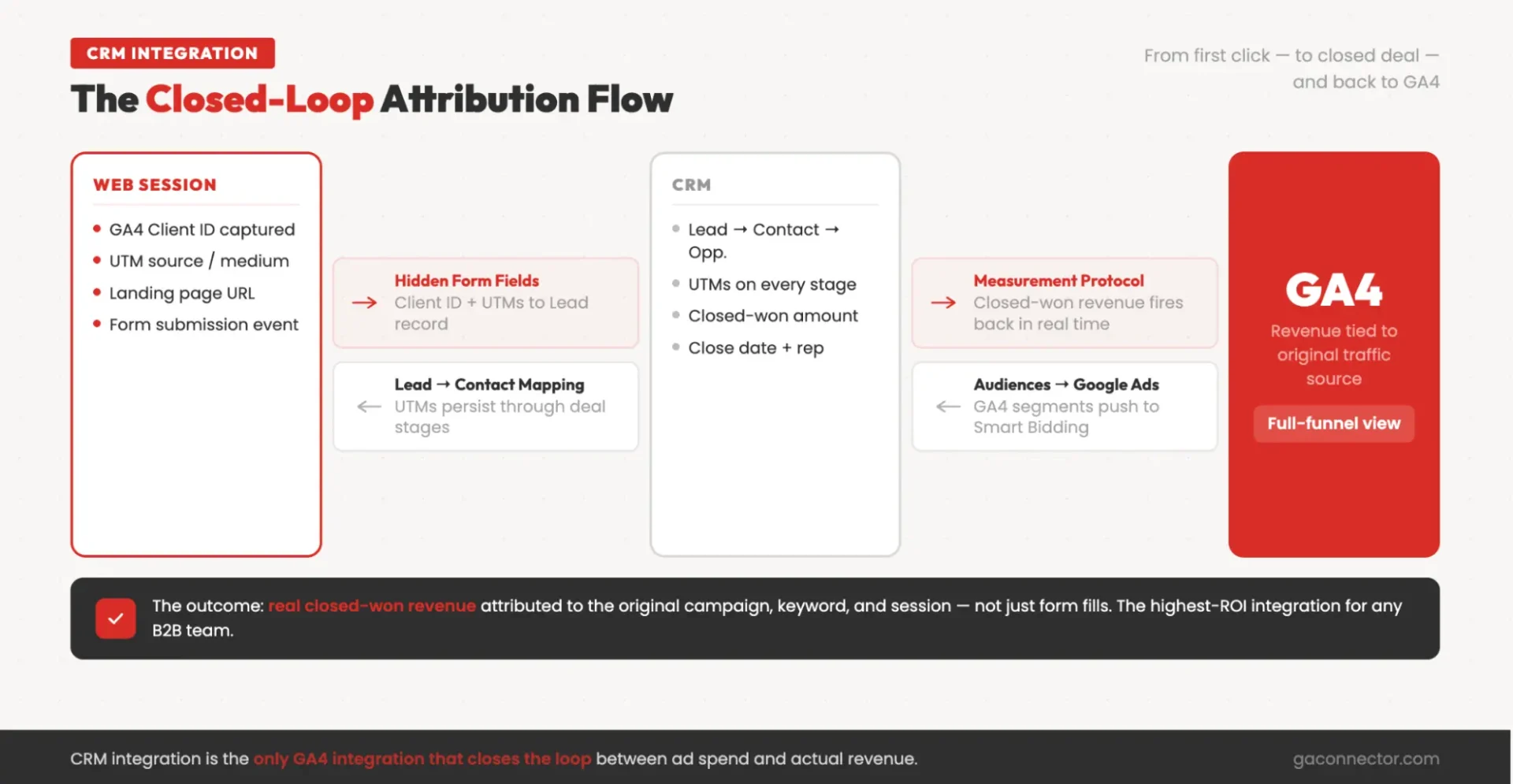
What they do. CRM integrations connect GA4 data – such as traffic sources, sessions, and website activity – with CRM data including leads, contacts, opportunities, and revenue. This allows businesses to connect marketing activity to actual sales outcomes instead of relying solely on form submissions and website conversions.
Why they matter. Many B2B sales happen offline and are invisible to GA4 by default. A CRM integration closes that gap by bringing revenue and pipeline data into the attribution process. As a result, teams can understand which channels, campaigns, and keywords generate customers rather than just leads. See the full-funnel attribution guide.
Popular platforms. Salesforce, HubSpot, Pipedrive, and Zoho are the most common CRM integrations. Most setups require capturing the GA4 Client ID, storing attribution data in the CRM, and sending key lifecycle events and revenue data back to GA4. Check our CRM-specific guides: HubSpot, Pipedrive, Zoho.
How they work. CRM integrations are usually bidirectional. Website and attribution data flow from GA4 into the CRM, while lead status changes, opportunity updates, and revenue data flow back into GA4 through methods such as Measurement Protocol, Data Import, or managed integration platforms.
Common challenge. Attribution data is often captured correctly when a lead is created but lost later in the sales process. Without proper field mapping between leads, contacts, and opportunities, valuable source and campaign information can disappear before a deal closes. See the UTM parameters guide.
If you’re on Salesforce, HubSpot, Pipedrive, or Zoho, GA Connector handles the CRM ↔ GA4 integration as a managed install – no dev work required.
Start a free trial → See the Salesforce integration →
2. Ad platform integrations
What they do. Ad platform integrations connect GA4 conversion data with advertising platforms such as Google Ads, Meta, Microsoft Ads, LinkedIn Ads, and TikTok Ads. This allows platforms to optimize campaigns based on actual conversion activity rather than clicks alone.
Why they matter. Every advertising platform tends to report conversions differently. Integrating GA4 creates a more consistent measurement framework, helping marketers compare performance across channels and make better decisions about marketing ROI, budget allocation, bidding, and campaign optimization.
Popular integrations. Google Ads offers a native GA4 integration, while Meta, Microsoft Ads, LinkedIn, and TikTok typically rely on a combination of tracking tags, conversion APIs, and server-side tracking methods.
How they work. Google Ads can receive conversion data directly from GA4 through a native integration. Other platforms often require additional tracking layers, such as Conversion APIs or server-side tagging, to receive conversion and attribution data reliably.
Common challenge. Duplicate conversions are one of the most frequent issues. If the same conversion is sent to an ad platform from multiple sources, reporting and bidding algorithms can become inaccurate. Regular audits help ensure each conversion is counted only once.
3. E-commerce platform integrations
What they do. E-commerce integrations connect platforms such as Shopify, WooCommerce, BigCommerce, and Magento to GA4. They send purchase events, product information, revenue data, and checkout activity into GA4 using the platform’s recommended e-commerce event structure.
Why they matter. Accurate purchase and revenue tracking is the foundation of e-commerce analytics. If purchases, product values, refunds, or checkout events are tracked incorrectly, every report built on that data becomes less reliable.
Popular integrations. Shopify offers a native Google integration, while tools such as Littledata, Elevar, and Analyzify provide more advanced tracking options. WooCommerce, BigCommerce, and Magento also offer native integrations, plugins, and GTM-based implementations.
How they work. Most stores start with a native integration for basic tracking. GTM is commonly added for customization, while server-side tracking is often used to improve data quality and reduce the impact of browser restrictions and ad blockers.
Common challenge. Native integrations often focus on purchases and basic checkout tracking but may not fully support refunds, returns, subscription renewals, or other post-purchase events. Businesses with subscription or recurring revenue models usually need additional tracking beyond the default setup.
4. Call tracking integrations
What they do. Call tracking integrations connect phone call conversions to the marketing channels, campaigns, and website sessions that generated them. They are especially important for businesses where leads frequently convert by phone rather than through online purchases or forms.
Why they matter. Without call tracking, phone leads are often missing from attribution reports or incorrectly classified as direct traffic. This creates blind spots in marketing reporting and makes it difficult to measure the true impact of campaigns that drive calls.
Popular integrations. CallRail is a common choice for small and mid-sized businesses, while Invoca and CallTrackingMetrics are often used by larger organizations with more advanced attribution and reporting requirements.
How they work. Most call tracking platforms use dynamic number insertion (DNI) to display unique phone numbers to visitors and connect calls back to specific sessions and traffic sources. Conversion events are then sent to GA4 through server-side integrations such as Measurement Protocol.
Common challenge. Call attribution is not perfect. Dynamic number insertion works best when the call happens during or shortly after the website visit. When visitors return days later and call directly, connecting that conversion to the original marketing source becomes more difficult.
5. BigQuery & data warehouse integrations
What they do. These integrations export raw GA4 event data into a data warehouse such as BigQuery, Snowflake, or Amazon Redshift. This makes it possible to combine GA4 data with CRM, advertising, finance, and product data for analysis that goes beyond GA4’s standard reporting capabilities.
Why they matter. Data warehouses provide access to raw event-level data, support custom attribution models, and remove many of the limitations of the GA4 interface. They also allow organizations to retain and analyze data over longer periods while building more advanced reporting and forecasting workflows.
Popular integrations. BigQuery is the most common option because it connects directly to GA4. Snowflake and Redshift are typically connected through ETL tools such as Fivetran, Airbyte, or Stitch. Visualization tools like Looker Studio, Power BI, and Tableau are often layered on top.
How they work. GA4 exports event data directly into a warehouse, where SQL is used to transform, combine, and analyze information from multiple systems. The warehouse becomes the central source for advanced reporting and attribution analysis.
Common challenge. Data warehouses offer flexibility but require technical expertise. Query costs, data modeling, and performance optimization need ongoing attention. For attribution analysis, daily exports are generally more reliable than streaming exports because some attribution fields may not be available immediately in streaming data.
6. Server-side tagging integrations
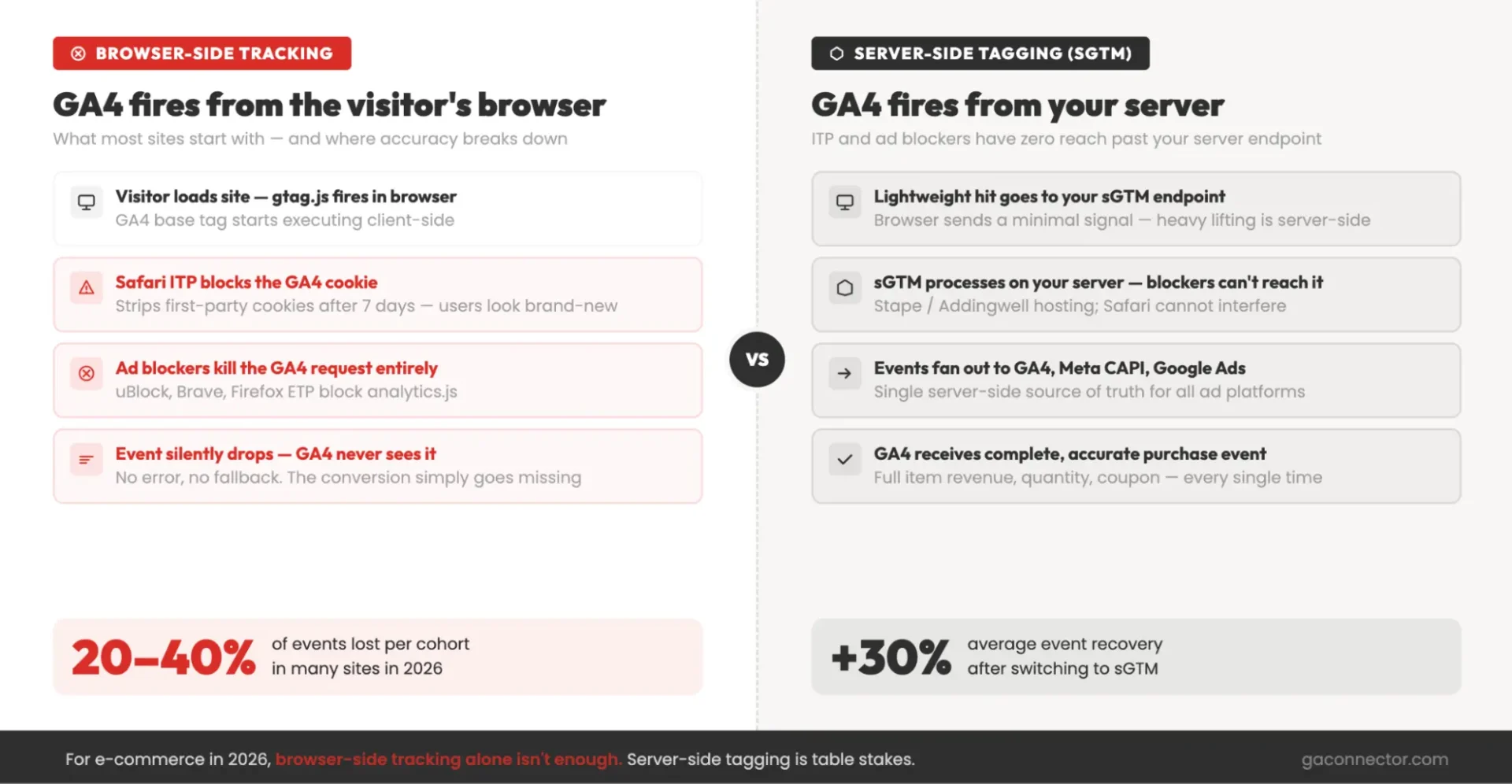
What they do. Server-side tagging moves part of your tracking setup from the visitor’s browser to a server environment you control. Instead of sending data directly from the browser to analytics and advertising platforms, events are routed through your server first and then forwarded to the appropriate destinations.
Why they matter. Browser-based tracking is increasingly affected by ad blockers, browser privacy features, and device restrictions. Server-side tagging can improve data collection accuracy, reduce data loss, and create a more consistent tracking foundation across analytics and advertising platforms.
Popular solutions. Google Server-Side Google Tag Manager (sGTM) is the most widely used option. Managed hosting providers such as Stape, Addingwell, and Yofu simplify deployment and maintenance by handling the underlying infrastructure.
How they work. Website events are sent to a server-side tagging endpoint rather than directly to GA4 or advertising platforms. The server then distributes those events to GA4, Meta, Google Ads, and other destinations from a centralized tracking layer.
Common challenge. Server-side tagging improves data collection but does not replace privacy compliance requirements. Consent Mode and consent management settings should be configured before deployment to ensure tracking operates correctly in regions with privacy regulations.
7. Tag management integrations
What they do. Tag management platforms centralize analytics tags, advertising pixels, and conversion tracking scripts in a single interface. This allows teams to create, update, and manage tracking without modifying website code for every change.
Why they matter. Without a tag manager, even small tracking updates often require developer involvement. Tag management tools give marketing and analytics teams more control over event tracking, campaign measurement, and platform integrations while reducing dependency on development resources.
Popular solutions. Google Tag Manager (GTM) is the most widely used option and the default choice for many GA4 implementations. Tealium is common in enterprise environments, while Matomo Tag Manager is often chosen by organizations with stronger privacy requirements.
How they work. A tag manager acts as a central layer between the website and analytics platforms. GA4 tags, custom events, advertising pixels, and other tracking scripts are configured within the tag manager and triggered based on predefined rules and conditions.
Common challenge. As tracking requirements grow, tag managers can become difficult to maintain without clear processes. Naming conventions, documentation, version control, and workspace governance are important for keeping implementations organized and preventing tracking issues over time.
8. Reporting & BI integrations
What they do. Reporting and business intelligence (BI) tools turn GA4 data into custom dashboards, executive reports, and cross-channel performance views. They make it easier to combine analytics, advertising, CRM, and revenue data in a single place.
Why they matter. GA4 is designed primarily for analysts and exploration. Most stakeholders need simplified dashboards that focus on business outcomes, trends, campaign performance, and revenue. Reporting tools help transform raw analytics data into information that supports decision-making across marketing, sales, and leadership teams.
Popular solutions. Looker Studio is the most common choice for small and mid-sized businesses thanks to its native GA4 integration. Supermetrics helps combine data from many marketing platforms, while Power BI and Tableau are popular enterprise reporting tools. Funnel.io and Windsor.ai are often used for marketing performance and attribution reporting.
How they work. Some tools connect directly to GA4 through native connectors, while others use BigQuery or ETL pipelines as the underlying data source. This allows businesses to blend GA4 data with CRM, advertising, finance, and operational data in a single reporting environment.
Common challenge. Reporting tools are only as reliable as the data behind them. Large datasets, blended sources, and long date ranges can introduce discrepancies or sampling issues. For highly accurate reporting and advanced attribution analysis, many organizations use BigQuery as the source of truth rather than relying solely on dashboard connectors.
9. CMS & website builder integrations
What they do. CMS and website builder integrations connect your website platform to GA4 by installing the base tracking code and enabling event collection. This is the foundation that every other GA4 integration relies on.
Why they matter. If GA4 is not implemented correctly at the website level, every downstream integration—from advertising platforms to CRM attribution—will be affected. A proper CMS integration ensures that website activity is captured consistently from the start.
Popular platforms. WordPress, Webflow, Wix, Squarespace, HubSpot CMS, and Ghost all offer straightforward ways to connect GA4. Most platforms support native integrations, plugins, or dedicated analytics settings.
How they work. In most cases, setup involves adding your GA4 Measurement ID to the platform’s analytics settings or through a plugin. Once connected, the website begins sending page views and other events to GA4.
Common challenge. Entering the Measurement ID is only the first step. Always verify the implementation using GA4 DebugView or real-time reports to confirm that events are being collected correctly and that tracking is working across key pages and user journeys.
10. Consent & privacy integrations
What they do. Consent and privacy integrations connect GA4 with a Consent Management Platform (CMP), allowing user consent choices to control analytics tracking, cookie storage, and advertising-related data collection.
Why they matter. Privacy regulations such as GDPR and growing state-level privacy laws require organizations to manage consent properly. A CMP automates this process, ensuring GA4 collects and processes data according to each visitor’s consent preferences.
Popular solutions. Cookiebot, OneTrust, Usercentrics, Iubenda, and Termly are among the most widely used consent management platforms. Most provide built-in support for Google Consent Mode. See Google Analytics documentation on Consent Mode.
How they work. When a visitor makes a consent choice, the CMP sends consent signals to GA4 (analytics_storage, ad_storage, ad_user_data, ad_personalization) that determine whether analytics and advertising-related data can be stored and used. GA4 then adjusts its behavior based on those permissions.
Common challenge. Privacy requirements continue to evolve. Organizations should regularly review their Consent Mode implementation and CMP configuration to ensure they support the latest consent signals and regulatory requirements. An outdated setup can result in incomplete data collection, reduced advertising functionality, or compliance issues.
11. Marketing automation integrations
What they do. Marketing automation integrations connect GA4 with platforms that manage email marketing, lead nurturing, lead scoring, and customer lifecycle campaigns. They help connect website behavior with marketing activities that happen after the first visit.
Why they matter. Many conversions happen after multiple email interactions, nurture campaigns, and follow-ups. Without connecting marketing automation data, GA4 only sees part of the customer journey and may miss the influence of campaigns that helped move prospects toward conversion.
Popular platforms. HubSpot, Marketo, ActiveCampaign, Mailchimp, and Klaviyo are among the most common marketing automation tools. Some platforms, such as HubSpot, can appear in multiple integration categories because they serve several functions at once.
How they work. Basic integrations often rely on native tracking settings and campaign tagging. More advanced setups use GTM, custom events, and Measurement Protocol to send lifecycle milestones, lead qualification events, and campaign engagement data into GA4.
Common challenge. Consistent campaign tagging is essential. Email traffic that is not tagged properly can distort attribution reports and make it difficult to measure the true impact of email and nurture campaigns. Establishing clear UTM conventions helps keep reporting accurate across the entire funnel.
12. Customer Data Platform (CDP) integrations
What they do. CDPs collect and unify customer data from multiple sources, including websites, mobile apps, CRM systems, email platforms, and support tools. They create a single customer profile and distribute data to downstream systems such as GA4, advertising platforms, and data warehouses.
Why they matter. As businesses add more channels and touchpoints, connecting customer identities across systems becomes increasingly difficult. CDPs help solve this problem by creating a unified view of the customer and ensuring that data remains consistent across the entire technology stack.
Popular platforms. Segment is one of the most widely used CDPs and offers native integrations with GA4. RudderStack is a popular open-source alternative, while mParticle is commonly used by larger organizations with complex customer data requirements.
How they work. A CDP collects events from multiple systems, resolves customer identities across devices and channels, and then forwards standardized data to platforms such as GA4. This creates a centralized data layer that supports analytics, attribution, personalization, and reporting.
Common challenge. CDP pricing is often based on event volume, which can become expensive as traffic grows. While CDPs can simplify data management and identity resolution, organizations should carefully evaluate costs against the complexity of their data ecosystem and reporting needs.
13. A/B testing & CRO integrations
What they do. A/B testing and conversion rate optimization (CRO) integrations connect experiment data with GA4, allowing you to analyze how different page variations affect user behavior, conversions, and revenue.
Why they matter. Testing platforms often report results separately from GA4, which can make it difficult to compare experiment outcomes with broader marketing and analytics data. Integrating experiments into GA4 allows teams to evaluate test performance alongside traffic sources, audience segments, and conversion metrics in a single reporting environment.
Popular platforms. VWO, Optimizely, AB Tasty, and Convert.com are among the most commonly used testing tools. Google Optimize is no longer available and should not be considered for new implementations.
How they work. Testing platforms typically send experiment and variant information to GA4 through custom events, Google Tag Manager, or server-side integrations. Variant assignments can then be used in GA4 reports and explorations to measure the impact of experiments.
Common challenge. Choosing the correct scope for experiment data is important. Variant information should generally be stored at the user or session level so it remains available for attribution, retention, and behavioral analysis. Incorrect scoping can limit the usefulness of experiment reporting.
14. Heatmaps & session recording integrations
What they do. Heatmap and session recording tools add qualitative insights to GA4 data by showing how visitors interact with your website. While GA4 reports what users did, these tools help explain how and why they behaved that way.
Why they matter. Metrics such as bounce rate, engagement rate, or conversion rate can highlight problems, but they rarely explain the cause. Heatmaps and session recordings provide visual evidence of user behavior, making it easier to identify usability issues, friction points, and opportunities for conversion rate optimization.
Popular platforms. Microsoft Clarity is a popular free option with strong GA4 compatibility. Hotjar remains widely used for heatmaps and feedback collection, while FullStory and Mouseflow are common choices for more advanced behavioral analysis.
How they work. These tools record user interactions and generate visual reports such as click maps, scroll maps, and session replays. Many integrations allow teams to move between GA4 segments and corresponding user recordings for deeper investigation.
Common challenge. Session recordings can capture sensitive user interactions if not configured properly. Before deployment, review privacy settings carefully and ensure that personal information, form fields, and other sensitive data are masked or excluded from recordings.
Which GA4 integrations should you set up first?
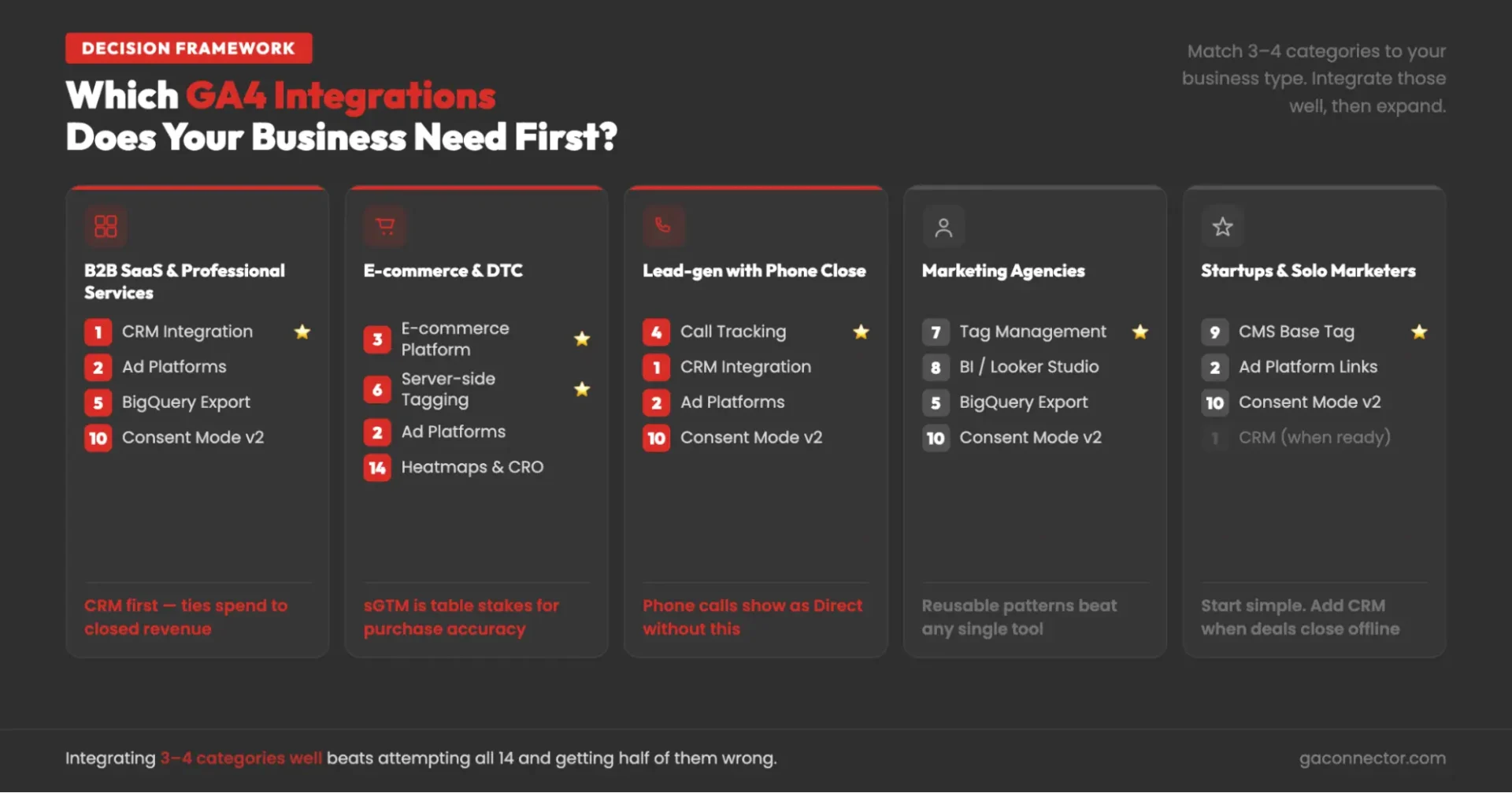
You don’t need all 14 integration categories. The right priorities depend on your business model and how customers convert.
B2B SaaS and professional services. Start with CRM integrations, ad platform integrations, BigQuery, and consent management. For businesses with sales-led funnels, the CRM integration usually delivers the most value because it connects marketing activity to pipeline and revenue. See the marketing attribution guide and closed-loop reporting overview for the strategic framing before the technical build.
E-commerce and DTC brands. Focus on e-commerce integrations, server-side tagging, ad platform integrations, and heatmaps. Accurate purchase tracking and reliable attribution are the foundation, while behavioral tools help identify conversion bottlenecks.
Businesses that close leads by phone. Prioritize call tracking, CRM integration, ad platform integration, and consent management. If phone calls are a major conversion path, tracking them correctly is essential for accurate attribution.
Marketing agencies. Focus on tag management, reporting and BI tools, BigQuery, and consent management. Standardized tracking, reporting templates, and governance processes often create more value than adding additional tools.
Startups and solo marketers. Begin with a proper website integration, native ad platform connections, and consent management. Add CRM integration once offline sales or longer sales cycles become important.
Two principles apply to every business:
Don’t try to implement everything at once. A few well-configured integrations will deliver far more value than a large stack of partially implemented tools.
Build in the right order. Start with the website and GA4 foundation, then add the integrations that directly support your business model. Advanced layers such as CDPs, A/B testing platforms, and heatmaps are most valuable after core tracking and attribution are working reliably.
Common GA4 integration mistakes (and how to avoid them)
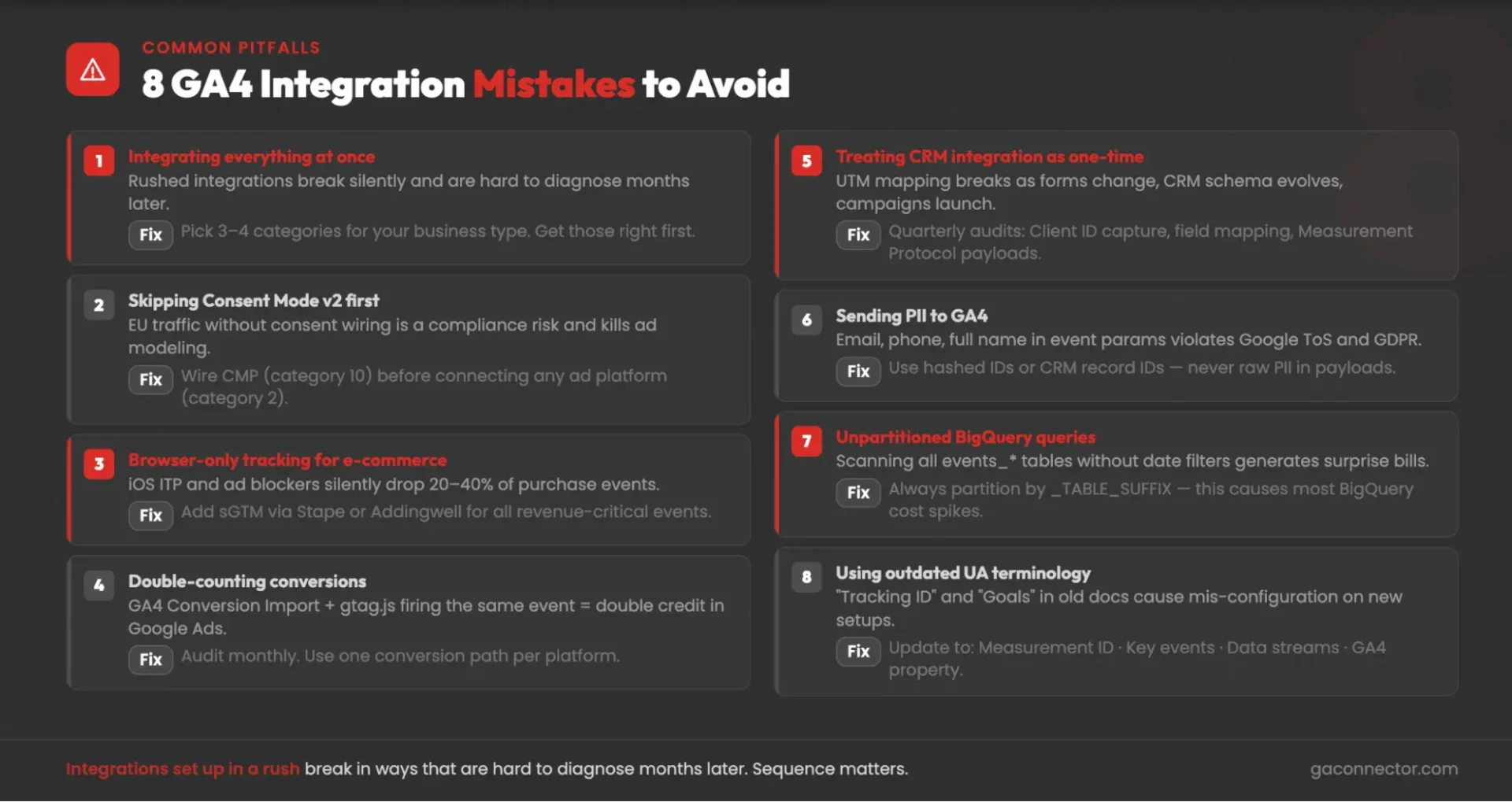
Trying to implement everything at once. Start with the integrations that matter most for your business. A smaller number of well-configured integrations will usually outperform a large, overly complex setup.
Adding ad platform integrations before consent management. Privacy and consent settings should be in place before connecting advertising platforms. Otherwise, you risk both compliance issues and incomplete attribution data.
Skipping server-side tracking for e-commerce. Browser restrictions and ad blockers can significantly reduce tracking accuracy. For businesses that depend heavily on revenue attribution, server-side tracking is often worth prioritizing.
Double-counting conversions. The same conversion can sometimes be sent to advertising platforms through multiple paths, inflating performance metrics. Review conversion sources regularly and ensure each conversion is tracked only once per platform.
Treating CRM integrations as a one-time project. CRM fields, forms, workflows, and campaign structures change over time. Regular audits help ensure attribution data continues to flow correctly as systems evolve.
Sending personal information to GA4. Email addresses, phone numbers, names, and other personally identifiable information should never be passed to GA4. Use internal IDs or anonymized identifiers instead.
Poor BigQuery query management. Large datasets can generate unnecessary costs if queries are not optimized. Applying date filters and using proper table partitioning are essential for controlling spend.
Using outdated Google Analytics terminology. Many teams still rely on terms from Universal Analytics. Keeping documentation aligned with current GA4 terminology helps reduce confusion and configuration mistakes as new integrations are added.
The GA4 integration landscape is bigger than most people think
GA4 integrations are not a single decision. They span 14 different categories, each solving a different problem and requiring a different implementation approach. The right place to start depends on your business model, your technology stack, and the questions you’re trying to answer.
Most small and mid-sized businesses gradually build their stack over time. They start with a solid GA4 implementation, then add ad platform integrations, CRM attribution, and consent management. As reporting needs become more advanced, they layer in server-side tracking, BI tools, heatmaps, experimentation platforms, and other supporting technologies.
The goal isn’t to connect every tool possible. It’s to create a data ecosystem that gives your team reliable answers about marketing performance, customer behavior, and revenue generation. Each integration adds another piece of that picture.
For SMBs whose biggest GA4 gap is the CRM – closed deals invisible to GA4, ad spend optimized on form fills instead of revenue – GA Connector is the managed integration that closes the loop for Salesforce, HubSpot, Pipedrive, and Zoho. The other 13 categories are real and worth investing in too; this is just the one we’ve spent a decade getting right.
Start your free trial of GA Connector → Book a demo →
Google Analytics integrations FAQs
What integrates with Google Analytics 4?
GA4 integrates across 14 categories: CRMs, ad platforms (Google Ads, Meta, Microsoft Ads, LinkedIn, TikTok), e-commerce platforms (Shopify, WooCommerce, BigCommerce), call tracking, BigQuery and data warehouses, server-side tag managers (sGTM, Stape), tag management (GTM, Tealium), BI tools (Looker Studio, Power BI, Tableau, Supermetrics), CMS and website builders, consent platforms (Cookiebot, OneTrust), marketing automation (HubSpot, Marketo, Klaviyo), CDPs (Segment, RudderStack), A/B testing (VWO, Optimizely), and heatmaps (Hotjar, Clarity). The right combination depends on your business type and which data gaps are most costly.
How do I integrate my CRM with Google Analytics 4?
CRM integration requires web traffic source data (GA4 Client ID, UTMs) flowing onto lead records at form submission, and closed-won deal data firing back to GA4 via the Measurement Protocol when deals close. For a full walkthrough, see the CRM ↔ GA4 integration guide; for a managed install, GA Connector handles the full build for Salesforce, HubSpot, Pipedrive, and Zoho.
What’s the difference between a GA4 native link and the Measurement Protocol?
A native link (Admin → Product Links) is a one-click connection limited to Google’s own products. The Measurement Protocol is GA4’s server-to-server API for sending events from any external system – CRMs, call tracking, offline databases – requiring dev work and a client_id to stitch events to web sessions.
Is the GA4 ↔ BigQuery integration free?
Yes – for standard GA4 properties, the native daily export to BigQuery is free and no longer requires GA 360 (changed in 2023). BigQuery storage and query costs are separate but typically low for SMBs if queries are partitioned correctly.
What’s the best GA4 integration for e-commerce?
Start with your platform’s native GA4 connector, then add server-side tagging (sGTM via Stape or Addingwell) for iOS/adblocker resilience. For Shopify, third-party apps like Littledata or Elevar fill gaps the native integration misses (refunds, subscriptions, server-side accuracy).
Do I still need Google Tag Manager with GA4?
Yes for most teams – GTM is the practical way to deploy the GA4 base tag, fire custom events, and update tracking without engineering deploys. Server-side GTM (sGTM) is the upgrade for teams where browser-side accuracy is a concern.
What replaced Google Optimize for A/B testing with GA4?
Google Optimize was sunset in September 2023. The leading replacements with native GA4 integrations are VWO, Optimizely, AB Tasty, and Convert.com – all fire experiment exposure as a GA4 event or user property for analysis in standard GA4 reports.
How does GA4 work with Consent Mode v2?
Consent Mode v2 is Google’s framework for respecting consent – when a visitor declines cookies, GA4 runs in modeled mode rather than collecting personal data. CMPs (Cookiebot, OneTrust, Usercentrics) fire four signals to GA4; the two signals added in v2 (ad_user_data, ad_personalization) are required for advertising features – older v1 setups that omit them see data loss.
What’s the difference between server-side tagging and the Measurement Protocol?
sGTM moves existing tag execution from the browser to a server you control, improving accuracy for web tracking. The Measurement Protocol is a separate API for sending events from external systems (CRMs, databases) into GA4 with a client_id to stitch them to web sessions – it’s for offline and CRM events with no browser-side equivalent.