Lead tracking is the process of recording where each lead came from, how they behaved before converting, and whether they eventually became a paying customer. It works by connecting traffic source data — channels, campaigns, keywords — to individual CRM records. Without it, you’re spending budget based on guesswork.
Why Lead Tracking Is Harder Than It Looks
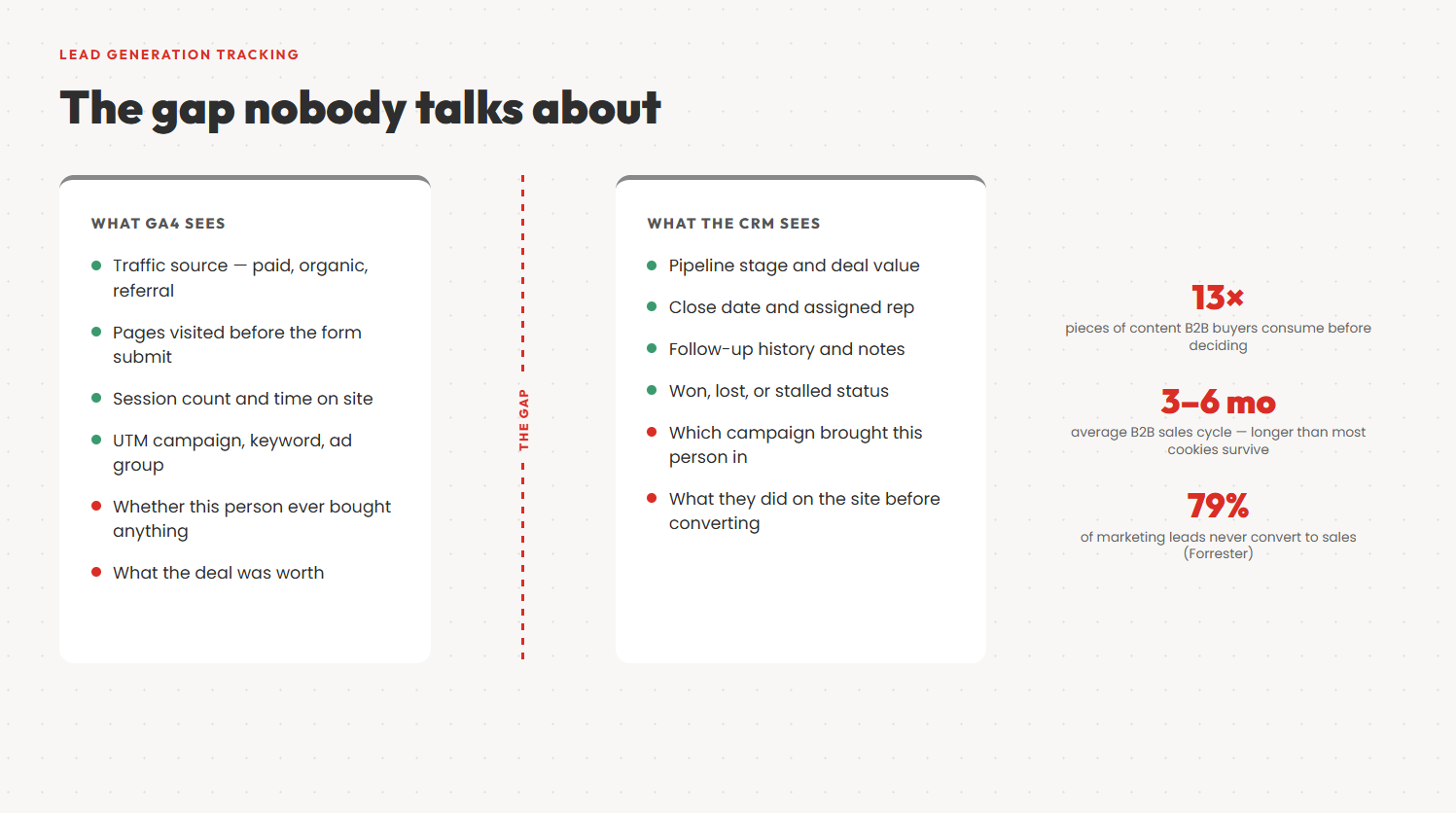
Most marketing teams think they’re tracking leads. They have Google Analytics, a CRM, maybe some UTM parameters. In practice, they’re tracking clicks and form fills. That’s not the same thing.
The gap opens the moment someone submits a form. GA4 records the conversion event. The CRM creates a contact. But nothing connects those two records. You know how many leads you got. You have no idea which campaigns drove the ones who actually bought.
It gets worse the longer your sales cycle is. In B2B, a lead might visit your site six times over three months before filling out a form. By the time they close, the cookie that recorded their first visit is long gone. GA4 has no memory of the Google Ads click in January that started the whole thing.
According to Forrester Research, the average B2B sales cycle runs three to six months — enterprise deals often stretch past a year. Any cookie-based tracking setup that can’t survive that window leaves attribution gaps on your most valuable deals. Not your cheapest ones. Your best ones.
Then there’s the multi-channel problem. A buyer sees a LinkedIn ad, ignores it, finds you again through organic search three weeks later, reads a case study, gets retargeted, and finally converts. Last-click attribution hands all the credit to the retargeting ad. Retargeting looks like a star. LinkedIn gets cut. According to Google’s Buyer Journey research, B2B buyers consume an average of 13 pieces of content before making a purchase decision — almost never from a single source. Your attribution model probably doesn’t reflect that.
The three things you actually need to track
Effective lead tracking that connects to revenue requires three things. Where the lead first came from — their first-click source. What channel they converted from — their last-click source. And what happened to them in your CRM after that: did they become a customer, and how much were they worth?
Most tools give you the middle one. The first and the last are where the real insight is.
Types of Leads and Why It Matters for Tracking
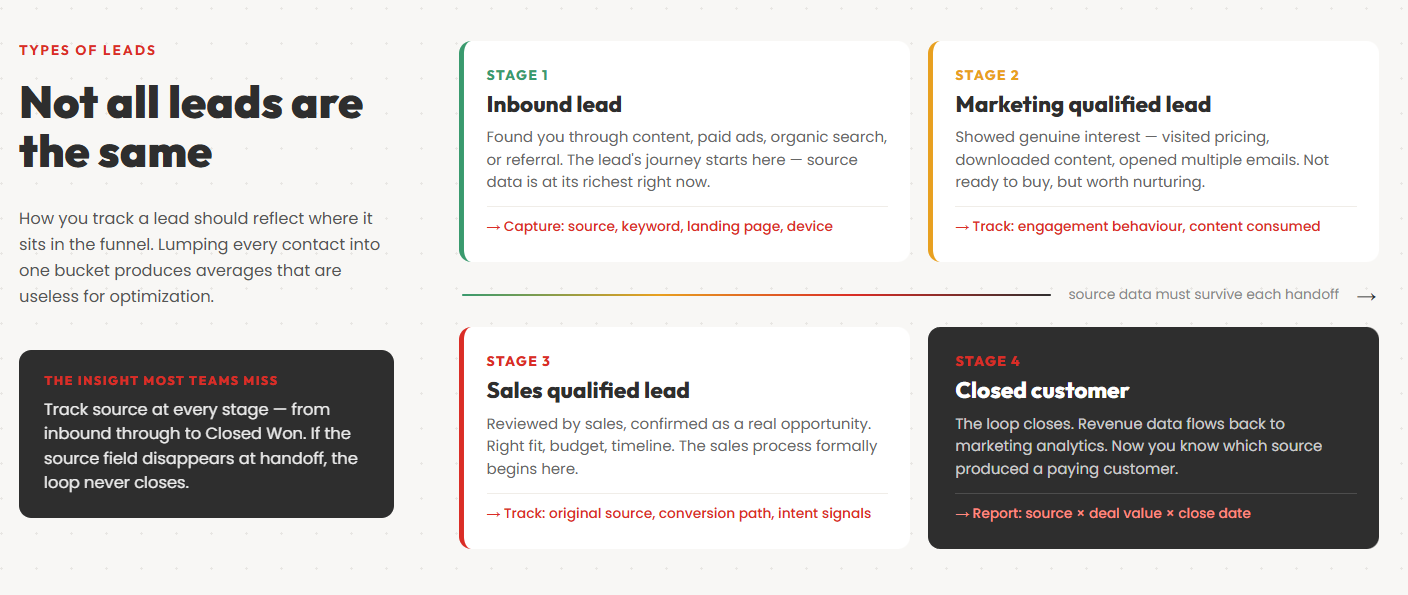
Not all leads are the same, and how you track them should reflect where they are in the sales funnel. Lumping every contact into one bucket produces averages that are useless for optimization.
Inbound leads
Inbound leads come to you. They found your content, clicked a paid ad, searched for a solution and landed on your site. The lead’s journey started with something you published or promoted — a blog post, a Google Ads campaign, a LinkedIn article, a case study.
Inbound leads are the ones most marketing teams are already trying to track. The challenge is attribution: which piece of content, which channel, which campaign actually triggered that first visit? Without source tracking baked into your lead capture process, inbound leads arrive in your CRM as anonymous contacts with no useful history attached.
Marketing qualified leads (MQLs)
A marketing qualified lead has done something that suggests genuine interest — downloaded a guide, attended a webinar, visited your pricing page multiple times, opened several emails. They’ve crossed a threshold that says they’re worth paying attention to, but they haven’t raised their hand to talk to sales yet.
The MQL definition varies by company. What matters is that you have one, it’s agreed upon by both marketing and sales teams, and it’s tracked consistently. An MQL without a source field is still nearly useless — you know someone is interested, but not what made them interested.
Sales qualified leads (SQLs)
A sales qualified lead has been reviewed by sales and confirmed as a real opportunity worth pursuing. They fit the right company profile, they have budget, they have a timeline. The handoff from marketing to sales has happened.
SQLs are where the sales process formally begins. Tracking the source of SQLs — not just MQLs — is where most companies discover which marketing channels actually drive revenue-worthy pipeline, not just volume. The signal that often separates an SQL from an MQL is high-intent keywords — search terms that indicate a buyer is actively comparing solutions rather than just researching a problem.
Qualified leads and pipeline stage
A qualified lead at any stage — whether marketing or sales qualified — should carry its source data forward through every pipeline stage. This is the data that eventually tells you which channels produce customers. If the source gets dropped when a lead moves from MQL to SQL, or from SQL to Opportunity, you’ve lost the attribution thread.
Most CRMs let you report on source by pipeline stage. Very few companies actually use this. It’s one of the highest-value reports in the entire sales process and it’s usually sitting unused in a corner of Salesforce or HubSpot.
The Lead Tracking Process: From First Touch to Closed Deal
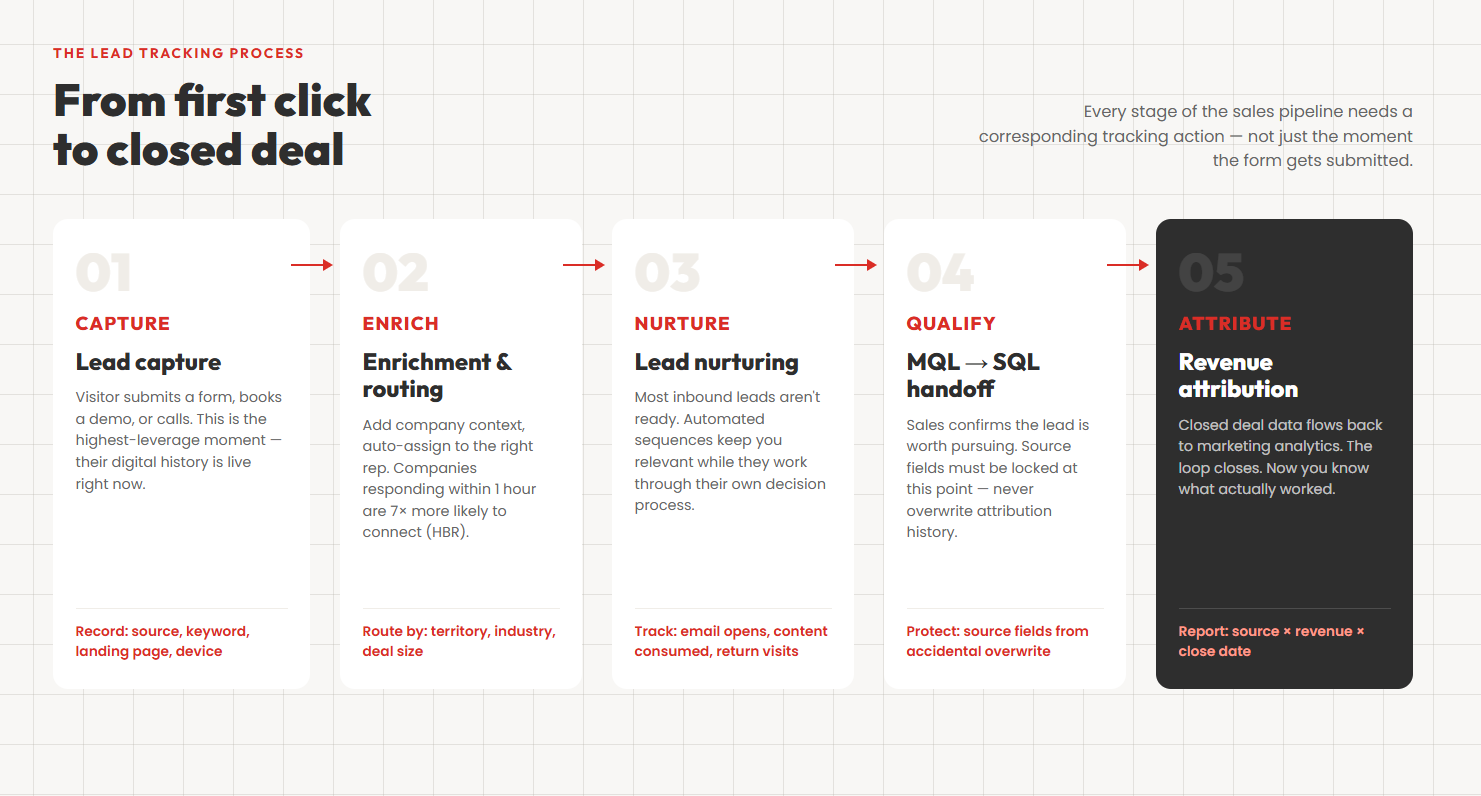
Lead tracking isn’t a single action — it’s a process that runs in parallel with your sales pipeline. Every stage of that pipeline needs a corresponding tracking action.
Step 1: Lead capture
Lead capture is the moment a visitor becomes a known contact. They submit a form, book a demo, start a chat, or call your number. This is the highest-leverage moment for data collection — you’ll never know more about this lead’s digital history than you do right now, while their session is still live.
At capture, you want to record at minimum: first-click source, last-click source, campaign name, landing page, and device type. You also want whatever they gave you explicitly — name, company, email, phone. The combination of declared data (what they told you) and behavioral data (what your tracking captured) is what makes a lead record genuinely useful.
Lead capture best practices:
Keep forms short. Every additional field beyond name, email, and company reduces completion rates. Capture the minimum you need to qualify the lead and route it correctly. Additional data can be gathered through progressive profiling in follow-up interactions.
Add a “how did you hear about us?” field. Put it on the form itself, not as a follow-up. It’s directional rather than authoritative — people remember the most memorable touchpoint, not necessarily the first — but the gap between what people report and what your tracking shows is almost always informative.
Make sure your tracking script fires before the form confirmation page. If your GA4 tag or CRM integration only fires on the thank-you page, a slow connection or a user closing the tab early can drop the attribution data.
Step 2: Lead enrichment and assignment
Once a lead is captured, it needs to be enriched and routed. Enrichment means adding context: company size, industry, job title, geography, intent signals. Some of this comes from the form. Some comes from tools that look up company data from an email domain. Some comes from lead behavior data — pages visited, time on site, content consumed.
Routing means getting the lead to the right person in sales, fast. Companies that respond to a new lead within an hour are seven times more likely to have a meaningful conversation than those that wait even 24 hours. Lead management software that automates routing — assigning leads based on territory, industry, or deal size — dramatically reduces the window between capture and first contact.
Step 3: Lead nurturing
Most inbound leads aren’t ready to buy. They’re researching. They filled out a form to get your guide or watch your webinar, and they might be six months away from an actual purchasing conversation. The lead nurturing phase is where you stay relevant to them while they work through their own decision process.
Lead nurturing typically runs through marketing automation — email sequences, retargeting campaigns, content recommendations. The goal is to maintain visibility and continue building trust until the lead signals they’re ready for a sales conversation.
The tracking challenge in nurturing is engagement attribution. Which nurture emails actually move leads forward? Which pieces of content accelerate the path from MQL to SQL? Without tracking lead behaviour across your nurture sequences, you’re sending emails into a void and hoping for the best.
Good lead management connects nurture engagement data — email opens, link clicks, content downloads, return site visits — back to the lead record in your CRM. This gives sales reps context when they finally do pick up the phone: they know what the lead has read, what questions they’ve asked, and what objections are likely.
Step 4: Qualification and handoff
The handoff from marketing to sales is one of the most common places lead data goes missing. Marketing creates the lead, populates the source fields, and hands off an MQL. Sales accepts the lead, starts working it, and sometimes — either through a CRM migration, a bad data entry habit, or just overwriting fields during an update — the source data disappears.
Marketing and sales teams need a shared definition of what constitutes a qualified lead and an agreed process for the handoff. The source fields should be locked or protected in your CRM so they can’t be accidentally overwritten once they’re set. Source is immutable history; it should never change.
Step 5: Conversion and revenue attribution
The loop closes when deal outcome data — won, lost, contract value, close date — is connected back to the original lead source. This is the revenue attribution step, and it’s what transforms lead tracking from an operational tool into a strategic one.
With this connection in place, you can ask and answer: which channels produce customers at the best lifetime value? Which campaigns produce the most SQLs? Which keywords produce the highest average deal size? These are the questions that actually inform budget decisions.
The 7 Core Methods for Tracking Marketing Leads
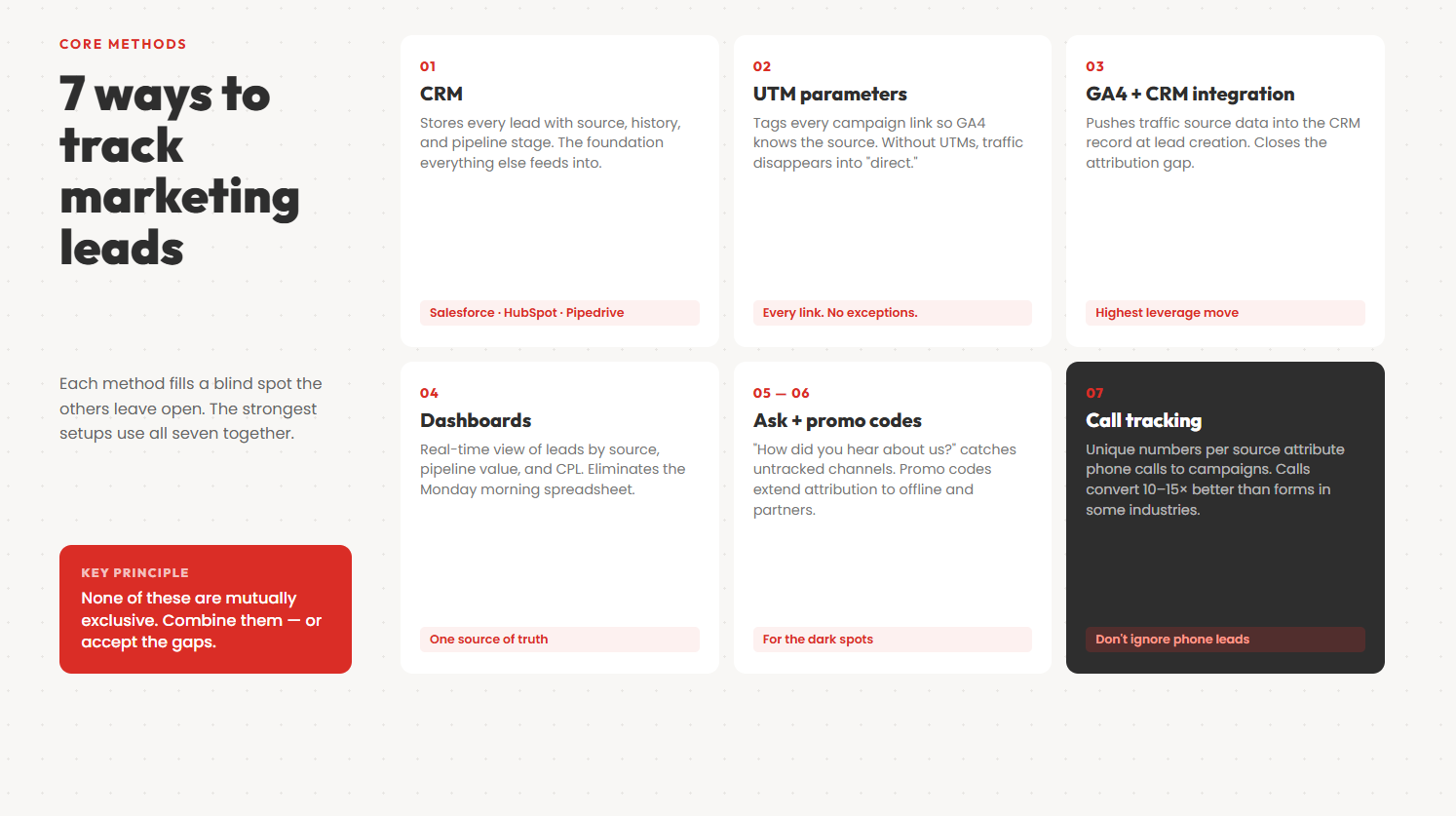
None of these are mutually exclusive. The strongest setups combine all of them — each fills a blind spot the others leave open.
1. CRM as your source of truth
A spreadsheet is not a lead tracking system. No history, no assignment, no pipeline stages, no reporting. The moment a second person needs access, you have a version control problem.
Customer relationship management software — Salesforce, HubSpot, Pipedrive — stores every lead with a timestamp, a source field, and a complete interaction history. It lets you segment by any field: “show me all leads from paid search in Q1 that are now Closed Won” — and actually get an answer.
The catch: CRMs rely on you to populate them with good data. According to Gartner, poor data quality costs organizations an average of $12.9 million per year. The culprit is rarely bad input — it’s empty fields. Source fields nobody fills in. Leads that arrive with no campaign attribution. Contacts manually created with no digital history at all.
The lead tracking process only works if every lead that enters your CRM carries its source data with it. The methods below automate that — so the data arrives correctly without depending on a sales rep to remember to type something.
2. UTM parameters on every campaign link
UTM parameters are short code tags appended to your URLs that tell Google Analytics which campaign sent a particular visitor. A link ending in ?utm_source=linkedin&utm_medium=paid&utm_campaign=q2-b2b tells GA exactly where that visitor came from.
Without UTMs, GA4 dumps a lot of traffic into “direct” — a catch-all for type-in traffic, misattributed email clicks, and dark social. Direct traffic is misattributed in the majority of B2B setups, with a large share being organic or email traffic that lost its source tag. That bucket is useless for decisions.
The discipline is attaching UTMs to every link you put in front of potential customers — paid ads, emails, social posts, partner links, SMS. Every link without UTMs is a leak. They add up fast. If you want to see how this works across real campaigns, 7 examples of UTM parameters in practice covers the most common setups.
One important limitation: UTM data stays in GA4. It doesn’t automatically flow into your CRM. That’s a separate problem addressed next.
3. Connect GA4 to your CRM
This is the highest-leverage thing you can do for sales lead tracking, and the one most teams skip because it sounds like an IT project.
GA4 knows everything about a visitor before they convert — channel, pages visited, number of sessions, time between visits. Your CRM knows everything after they convert — deal stage, close date, contract value. Neither can see what the other knows.
Connecting them gives you something neither has alone: a record that says “this customer came from a Google Ads campaign, visited three pages, converted on their second session two weeks later, and became a $40,000 deal.”
Tools like GA Connector push traffic source data from GA4 into your CRM the moment a lead is created. The record picks up first-click source, last-click source, campaign name, keyword, landing page, and device type — without your sales team touching anything. You can also push closed deal data back from the CRM into GA4, so your analytics show actual revenue instead of just form submissions.
That revenue-back-to-GA piece is what finally makes it possible to answer: which keywords produce profitable customers?
4. Marketing and sales dashboards
Having the lead data and being able to read it at a glance are two different things.
Dashboards pull your key metrics into one place: leads by source, conversion rates by channel, sales pipeline value, cost per qualified lead. They eliminate the Monday morning spreadsheet — pulling numbers from GA4, pulling numbers from the CRM, copying them into a Google Sheet, wondering if last week’s version is still open in another tab.
According to HubSpot’s State of Marketing report, marketers relying on manual reporting spend a significant chunk of their week compiling numbers rather than acting on them. Teams with automated dashboards make campaign decisions faster.
Build the right dashboard for the right audience. Marketing sees traffic by channel, lead volume, CPL. Sales sees pipeline stages, rep conversion rates, time to close. Leadership sees the revenue view — top-of-funnel spend connected to closed deals. If your GA4 and CRM are already connected, all three pull from the same underlying data.
5. Asking leads directly
The “how did you hear about us?” question is imperfect. It’s also more useful than most teams give it credit for.
People remember the touchpoint that felt most significant — a podcast they caught, a colleague’s recommendation, a conference. That’s often not what your analytics records as the source. Self-reported data and tracked data tell different stories, and the gap between them is usually informative.
If 40% of leads say they heard about you through word of mouth but your CRM shows zero referral-source leads, something isn’t being tracked. If everyone says Google but UTM data shows most traffic is from LinkedIn, your channel strategy probably doesn’t match how people actually find you.
Put this question inside your lead form, not as a popup after submission. Response rates are higher when it’s part of the original process. Treat the answers as directional — useful for spotting untracked channels, not for making budget allocation decisions.
6. Promo codes for offline and partner channels
UTMs work for digital. They’re useless for everything else.
Podcast sponsorships, out-of-home, print, referral partnerships — there’s no link to track. Promo codes are the workaround. Give each channel or partner a unique code, track redemptions, and you have proxy attribution for non-digital conversions.
The same goes for regional activity. Different codes per city or store give you local performance data no digital analytics tool will ever surface. According to the Content Marketing Institute, offline channels — events, partnerships, direct mail — still drive a meaningful portion of enterprise B2B pipeline. Non-digital attribution isn’t an edge case; it’s a gap most teams just accept.
Promo codes aren’t clean. Not everyone who converts uses the code. But for channels that are otherwise invisible to your entire analytics stack, an imperfect signal beats no signal.
7. Call tracking
Phone calls are among the highest-intent actions a prospect can take — especially in B2B, financial services, healthcare, or anything with a complex, high-value purchase. Someone who picks up the phone to call your sales line is not casually browsing. Not tracking those calls means your attribution data is missing some of your best-fit leads.
According to Google’s research on mobile behavior, calls convert at 10 to 15 times the rate of web form submissions in certain industries. That’s not a rounding error — it’s a category difference.
Call tracking software — CallTrackingMetrics, CallRail, Ringostat — assigns a unique number to each traffic source. Google Ads visitors see one number; organic visitors see another. When someone calls, the system captures which number they dialed, attributes it to its source, and pushes that into your CRM. Most modern call tracking tools also record and transcribe calls, so you can tag conversations as qualified or not and feed that signal back into your attribution data.
Lead Management: What Happens After the Form Submit
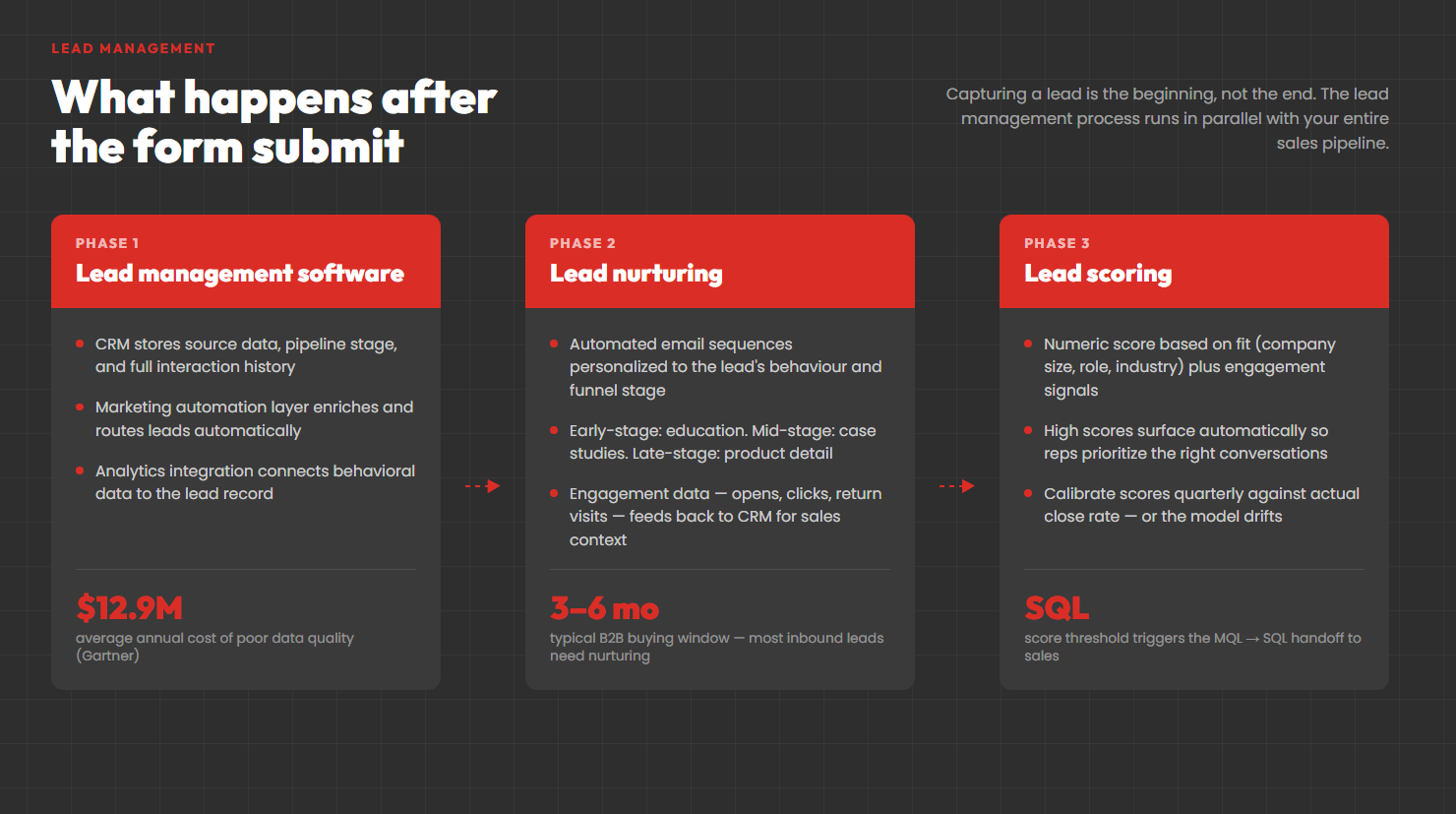
Capturing a lead is not the end of the process — it’s the beginning. The lead management process covers everything from that first form submission through to deal close or disqualification. Most companies have a capture process. Far fewer have a management process that actually works.
Lead management software
Lead management software is any tool that helps you organize, route, track, and act on leads systematically. In practice, this usually means a CRM with automation rules layered on top — but standalone lead tracking software platforms like Marketo, Pardot, and ActiveCampaign sit between your marketing channels and your sales CRM, handling enrichment, scoring, and routing before a lead ever reaches a rep.
The minimum viable lead management stack for most B2B companies is a CRM with source tracking, a marketing automation platform for nurture sequences, and some form of analytics connection. Each tool handles a different phase of the lead’s journey — from first click to closed deal — and the data needs to flow between them cleanly. This is the operational backbone of pipeline marketing: connecting every stage of the funnel to a measurable outcome.
Lead nurturing and marketing automation
Lead nurturing is the process of building a relationship with a lead who isn’t ready to buy yet. Most inbound leads need it. They’re interested enough to download something or fill out a form, but they’re three to six months away from a real purchasing decision.
Marketing automation runs the nurture sequences — typically email drips triggered by lead behaviour. A lead who visited your pricing page gets a different sequence than one who downloaded a beginner’s guide. A lead who opened three emails in a row is closer to SQL than one who hasn’t engaged in a month. Good lead nurturing is personalized to where the lead is in the decision process, not just where they are on a calendar.
The tracking requirement for effective lead nurturing is engagement data. You need to know which emails got opened, which links were clicked, which content pieces a lead consumed before they became sales-ready. Without that, you can’t improve the nurture process and you can’t give sales reps useful context at handoff.
Lead scoring
Lead scoring assigns a numeric value to a lead based on a combination of fit (how closely they match your ideal customer profile) and engagement (how active they’ve been with your content and communications). A score of 80 might mean a VP at a 500-person SaaS company who has visited your pricing page twice and opened your last four emails. A score of 20 might mean an individual contributor at a small company who downloaded one thing six weeks ago and hasn’t been back.
Scoring helps marketing and sales teams prioritize. Rather than handing every MQL to sales and asking reps to sort through them, scoring surfaces the leads most likely to convert. Reps spend time on the right ones. Lead volume goes down; lead quality goes up.
The catch is that scoring models need to be calibrated against actual outcomes. If your score of 80 leads close at the same rate as your score of 40 leads, your model is measuring the wrong things. Audit your scores quarterly against closed deal data and adjust.
Measuring Lead Effectiveness
Tracking leads is not the same as measuring them. Lead data only creates value if you analyze it — and analysis requires knowing which metrics actually indicate something meaningful.
Metrics that matter
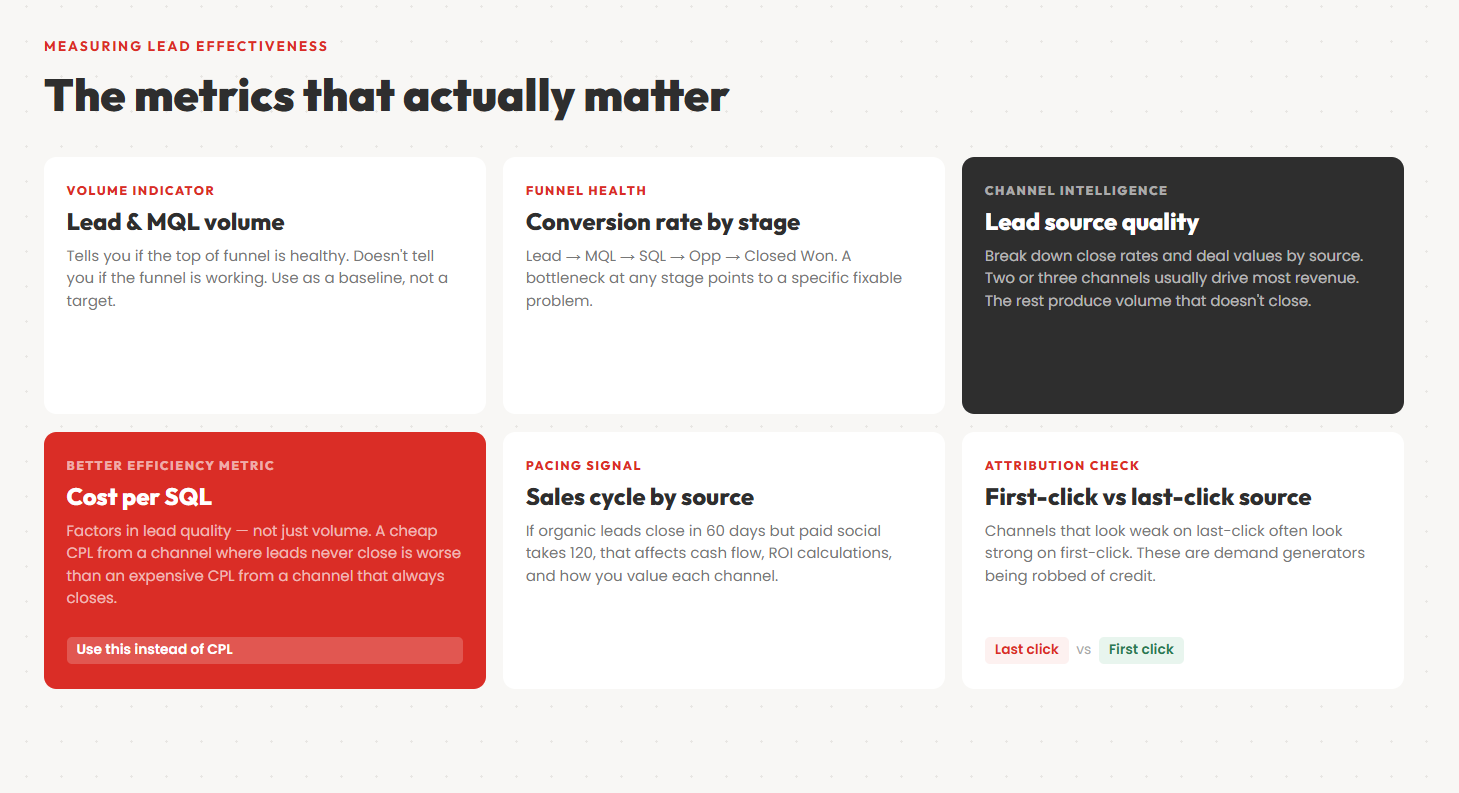
Volume metrics — number of leads, MQLs, SQLs per period — tell you if the top of your funnel is healthy. They don’t tell you if the funnel is working.
Conversion rate by stage is more useful. What percentage of leads become MQLs? MQLs to SQLs? SQLs to Opportunities? Opportunities to Closed Won? A bottleneck at any stage points to a specific problem: poor nurturing, weak qualification criteria, a broken sales process, a mismatch between marketing messaging and sales reality.
Lead source quality is the metric most teams underuse. Break down your conversion rates and average deal values by source — paid, organic, referral, direct, email — and you’ll almost always find that two or three sources are responsible for the majority of closed revenue. The others are producing volume that doesn’t convert. Reallocating budget from low-quality to high-quality sources is the single highest-ROI optimization most marketing teams can make.
Cost per SQL is a better efficiency metric than cost per lead. It factors in lead quality by measuring the spend required to produce not just a contact, but a contact a salesperson has confirmed is worth pursuing. Channels that look cheap on CPL often look expensive on cost per SQL.
Sales cycle length by source is underappreciated. If leads from organic search close in 60 days but leads from paid social take 120 days, that affects everything from cash flow forecasting to how you evaluate channel ROI. Faster-closing channels are worth more than their CPL suggests.
Lead attribution reports
Once your CRM and analytics are connected, the most valuable report you can run is source by outcome. Segment your closed deals by first-click source and last-click source and compare: which channels start conversations, and which ones close them?
Some channels appear weak on last-click attribution but strong on first-click. These are your demand generation channels — they plant the seed but rarely get credit for the harvest. Cutting them based on last-click data is a common and expensive mistake.
The inverse also happens: some channels show up constantly as last-click because they intercept high-intent searches from buyers who were already going to convert anyway. These channels look efficient on last-click, but they’re not actually generating new demand. They’re just present at the end of a journey someone else started.
Seeing both tells you which channels to invest in for growth versus which ones are just capturing demand that already existed.
From Lead Tracking to Revenue Attribution
Tracking where leads come from is the foundation. The actual goal is knowing which sources produce customers.
Most marketers use cost per lead as their main efficiency metric. Reasonable. But it falls apart when lead quality varies by channel. A channel producing cheap leads that never close is worse than one producing expensive leads that almost always do. You cannot see that without connecting lead source data to closed deal data.
79% of marketing leads never convert to sales. Some of that is expected drop-off. But a significant portion is a lead quality problem — and without channel-level quality data, you can’t tell whether a channel generates bad leads or just generates leads your sales team isn’t prioritizing.
Revenue attribution means the lead source field survives the entire sales cycle — form fill to Closed Won — as a persistent record in your CRM. If it gets overwritten at the handoff to sales, the loop never closes. You never know what worked.
First-click vs. last-click attribution
Last-click attribution is the default in almost every analytics tool. Final touchpoint gets all the credit. Easy to set up. But it reliably undervalues anything that generates demand early — the channels that introduce you to buyers who then convert somewhere else later.
First-click attribution has the opposite bias. It credits the initial touchpoint and ignores everything that converted the lead.
Neither is correct. What you actually want is both. A lead that arrived first via LinkedIn and converted from a Google branded search tells a different story than one that came cold from Google Ads and bought the same day. Storing both first-click and last-click on every CRM record lets you see which channels start conversations and which ones close them — without locking yourself into a single attribution model. If you want to go deeper on this, the full-funnel attribution guide covers multi-touch models in detail.
A real example: how lead tracking saves seven-figure budgets
NetReputation is one of the largest online reputation management companies in the US. They weren’t struggling to generate leads. They had no idea which ones were actually worth anything.
After connecting their sales lead tracking through GA Connector, every CRM record carried source data: keyword, campaign, landing page. That data made it obvious which keywords produced paying clients and which produced people who never converted. They cut the underperforming spend and put the money where it was working. The result was millions of dollars in savings with no drop in qualified pipeline. Read the full case study here.
Nothing complicated. Just the right lead data in the right place.
Common Lead Tracking Mistakes
Treating form fills as conversions
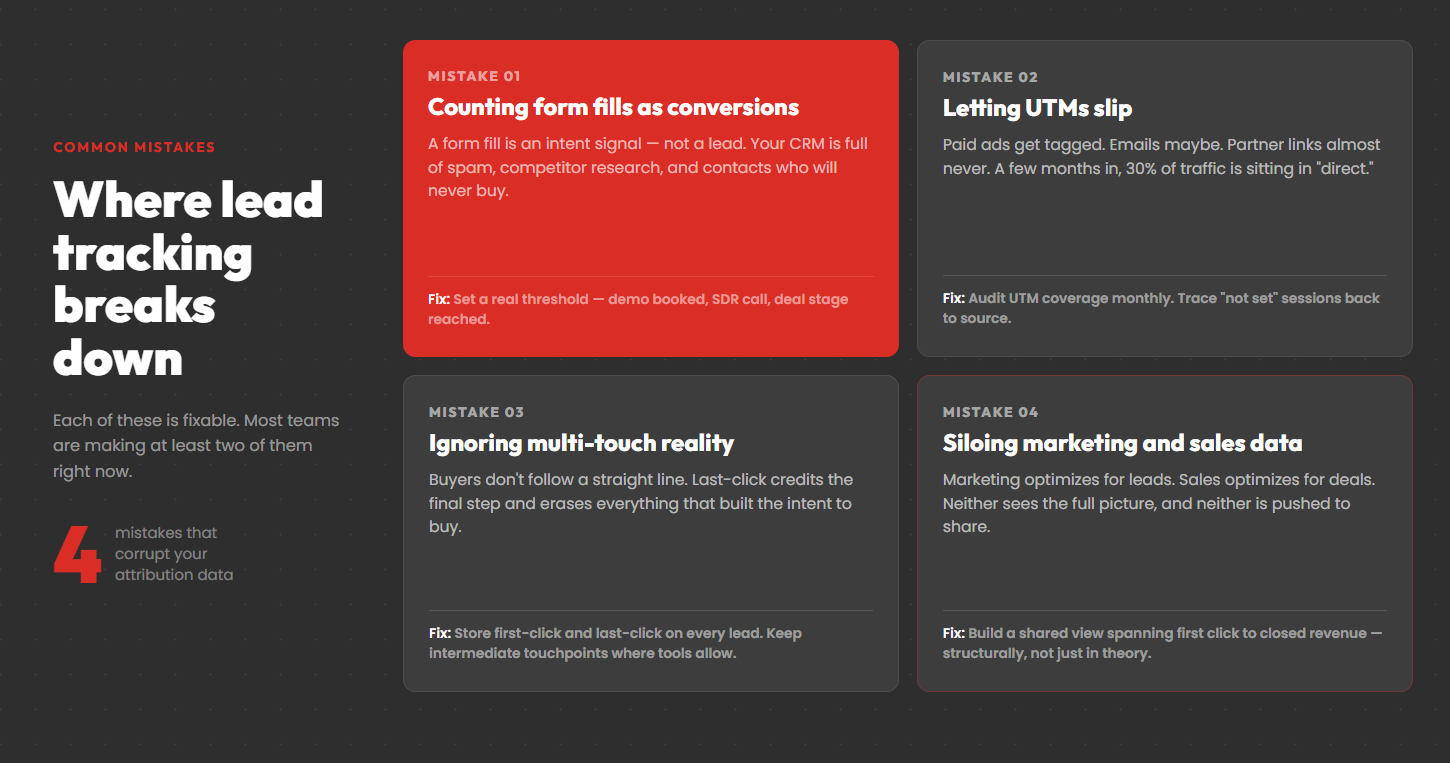
A form fill is not a lead. It’s an intent signal. Every CRM accumulates spam submissions, competitor research, and contacts who will never buy. Counting form fills as conversions inflates your numbers and corrupts your attribution.
Pick a real qualification threshold — demo booked, SDR call completed, deal stage reached — and use that as your conversion metric. Your cost per conversion will look worse. It will be accurate. Decisions made on accurate data are better than decisions made on flattering data.
Letting UTMs slip
UTM discipline falls apart in practice. Paid ads get tagged. Emails maybe. Partner links almost never. A few months in, 30% of traffic is sitting in “direct” and nobody can explain it.
Audit UTM coverage monthly. Pull a GA4 report on sessions by source/medium, sort by “not set,” and trace those back. The gaps show exactly where attribution is leaking.
Ignoring multi-touch reality
Buyers don’t follow a straight line. Ad, organic search, case study, retargeting, conversion — all from different sessions across different weeks. Attributing that to one channel is almost always wrong, and almost always credits the last step while ignoring everything that built the intent to buy.
You don’t need a sophisticated multi-touch model to fix this. You need to stop discarding data. Store first-click and last-click on every lead. Keep intermediate touchpoints where your tools allow. The analysis can come later. The data needs to exist first.
Not defining the lead management process before building it
Most lead tracking problems are symptoms of a process problem upstream. There’s no agreed definition of an MQL. No clear criteria for SQL handoff. No shared view of what a “good lead” means. Marketing and sales teams are optimizing for different things, and neither is wrong given their own metrics.
Define the lead management process in writing before you build anything. What makes an MQL? What triggers a handoff to sales? What does the nurturing sequence look like for a lead that isn’t ready yet? What happens to a lead that goes cold? These decisions determine what you need to track — not the other way around.
Keeping marketing and sales data separate
Marketing optimizes for leads. Sales optimizes for deals. Neither sees the full picture. And the incentive structures rarely push them to share.
The fix is structural: a shared reporting view running from first click to closed revenue. Once it exists, you can answer the questions that actually matter — which channels produce customers, at what acquisition cost, with what deal size. Without it, you’re making budget decisions on instinct dressed up as data.
FAQ
What is the difference between lead tracking and lead scoring?
Lead tracking records where a lead came from and what they’ve done. Lead scoring assigns a numeric value based on behaviors and fit — visit frequency, content engagement, how closely they match your ideal customer profile. Tracking is the data layer. Scoring is built on top of it. You can’t score well without accurate tracking underneath.
What is lead management software and do I need it?
Lead management software is any tool that helps you organize, prioritize, route, and follow up with leads systematically. At minimum this is a CRM. More mature setups add a marketing automation platform for nurture sequences and a lead scoring layer. Whether you need dedicated lead management software depends on volume — when leads are coming in faster than your team can manually review and route them, software automation stops being optional.
How long should lead source data be stored?
Indefinitely. B2B sales cycles stretch across quarters and years. A source field recorded 18 months ago is still useful when the deal closes. Most CRMs keep field data permanently unless you delete it — double-check that your data hygiene rules aren’t quietly purging old source fields.
Does lead tracking work for phone calls?
Yes. Call tracking software assigns unique phone numbers to each traffic source and pushes call data — including attribution — into your CRM. Tools like CallTrackingMetrics, CallRail, and Ringostat integrate with major CRMs and can pass a Google Analytics Client ID alongside the call record, so phone conversions get attributed just like web form submissions.
What happens to lead source data if someone converts months after their first visit?
Depends on your setup. GA4 cookies default to a 13-month lifespan, but browsers and ad blockers often shorten that. Pure cookie-based tracking loses attribution on long sales cycles. Tools that store first-click data server-side at the moment of first touch are unaffected. GA Connector writes source data to the CRM record when the lead is created — it stays there regardless of when the deal closes.
How do I nurture leads that aren’t ready to buy?
With a sequenced content program tied to where the lead is in their decision process. Early-stage leads need education — content that defines the problem and builds the case for solving it. Mid-stage leads need proof — case studies, comparison content, ROI calculators. Late-stage leads need confidence — detailed product information, implementation guides, customer references. Marketing automation routes leads into the right sequence based on their behaviour, and a good CRM integration means sales reps can see what content each lead has consumed before the first call.
Can I track leads without a CRM?
Technically, yes. Spreadsheets work at very low volumes. But you lose pipeline visibility, team collaboration, automation, and the ability to connect marketing data to revenue at any useful scale. A CRM is the minimum viable setup for taking lead tracking seriously.
How do I track leads from referral partners?
UTMs work if partners send traffic through trackable links. For phone referrals, in-person introductions, and conference conversations, use unique promo codes or dedicated landing pages per partner. Your CRM should have a source field where you record “referred by [Partner Name]” when non-digital leads come in.
What is closed-loop lead tracking?
Closed-loop tracking means campaign data flows into your CRM when a lead is created, and revenue data from closed deals flows back into your marketing analytics. The loop closes when your analytics platform can show which campaigns, keywords, and channels produced paying customers — not just contacts. It requires connecting your CRM and analytics tool bidirectionally. For a full breakdown of how to set this up, see our guide to closed-loop reporting. It’s also the only way to make budget decisions based on actual revenue rather than lead volume.
What metrics should I use to measure lead quality?
The most direct measure is conversion rate from lead to closed deal, segmented by source. Secondary metrics include: cost per SQL (more honest than cost per lead), sales cycle length by source, average deal size by source, and churn rate by source. Leads that convert quickly, close at high value, and don’t churn are your best leads — regardless of what they cost to acquire.