It’s Monday morning and a marketing director opens three dashboards. Google Ads says paid search drove 60% of leads last quarter. Google Analytics 4 says organic search is the real hero. The CRM tells a third story.
Here’s the thing – none of them are lying. They’re just using different attribution models. Different rules for assigning credit to the marketing touchpoints that contributed to a sale. Marketing attribution is how you decide which channels get credit for a conversion, and the marketing attribution model you pick changes everything.
In this guide, we’ll cover what marketing attribution is, walk through the six most-used marketing attribution models (first-touch, last-touch, linear, time-decay, position-based, data-driven), look at when each one makes sense, and end with a decision framework for picking the right marketing attribution model for your business.
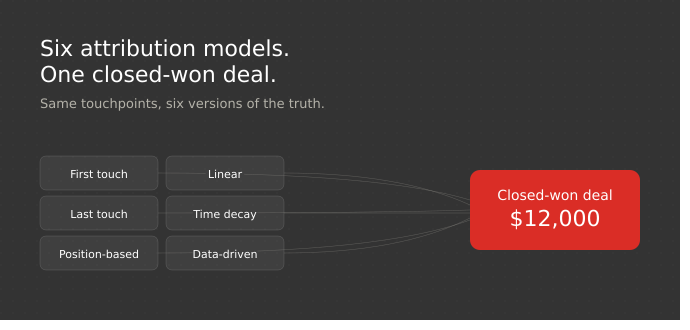
What is marketing attribution?
Marketing attribution is the process of identifying which marketing touchpoints contributed to a conversion and assigning credit to each one. A “touchpoint” is any user interaction – an ad click, a blog visit, an email open, a webinar registration, a demo booking, a sales call. A “conversion” is whatever your business defines as a win.
Why does the discipline exist at all? Because the modern customer journey isn’t a straight line. According to Forrester’s State of Business Buying, the average B2B purchase now involves 13 internal stakeholders, with 89% of decisions crossing two or more departments. Each one of those stakeholders touches multiple marketing channels across weeks before anyone converts.
A few distinctions worth getting right early on.
Tracking and attribution aren’t the same thing. Tracking is collecting touchpoint data. Attribution is the rule you apply to decide who gets credit. Easy to mix up – don’t.
Platform-native reports systematically over-credit themselves. Google Ads claims every conversion that touched a Google Ad. Meta does the same. LinkedIn does the same. Add it all up and total platform-reported conversions exceed actual conversions by 200–400%, because each platform sees only its own slice of the customer journey. (You can probably guess how this ends if you trust any one of them in isolation.)
The “offline conversion” problem is the killer for B2B. If your deals close in a CRM rather than on a website, attribution has to connect the web journey to the sales pipeline. You can know exactly which paid ad drove a form fill and have absolutely no idea which one drove a $50k contract.
Privacy shifts have changed the game. iOS tracking changes, third-party cookie limitations, GDPR – cross-site tracking is breaking down. Modern marketing attribution depends on first-party data and CRM integration. Some teams also use zero party data – info buyers give you directly, like a “how did you hear about us?” form field. (We’ll come back to this.)
Why marketing attribution is important to SMBs
Picture a 50-person SaaS company spending $40k/month across paid search, SEO, LinkedIn, email, and events. Their marketing efforts span the full customer journey. But the reporting tells totally different stories depending on which marketing attribution model you ask.
Under last touch attribution, paid search looks like the winner. SEO gets cut. Six months later, top-of-funnel lead generation collapses – turns out the SEO content was doing the heavy lifting and paid search was just closing demand SEO had already created.
Under first touch attribution, the story flips entirely. SEO and content wear the crown. A quarter later, conversion rates tank.
Under a multi touch attribution model, the actual story finally emerges: LinkedIn ads and the webinar series were doing the heavy lifting in the middle of the customer journey. Cut either, and the pipeline tanks.
That’s why marketing attribution matters – and why the marketing attribution model you choose has direct revenue consequences for your marketing plan.
Three concrete outcomes to expect:
- Smarter budget allocation. You stop funding marketing tactics that look great in ad platforms but never convert in the CRM. Marketing attribution helps you optimize media spend across digital campaigns instead of guessing how to allocate marketing spend.
- Honest channel performance. SEO and content stop getting punished by last-click defaults. Top-of-funnel marketing efforts finally get credit for the pipeline they generate.
- Better forecasting. When you know which channels actually drive revenue, you predict pipeline accurately and allocate resources with confidence. Marketing performance becomes a number you can defend to the CFO – see our ads ROI calculation framework for the math.
HubSpot’s State of Marketing report found that marketing teams who connect campaign data to revenue are roughly twice as likely to hit pipeline targets. Marketing attribution helps surface which marketing tactics deserve more investment.
Single-touch vs multi touch attribution
There are two big families of touch models, and it’s worth understanding the split before we get into specific models.
Single-touch attribution gives 100% credit to one interaction – first or last. Single-touch models are simple and fast. They work for short sales cycles and low-volume businesses where one touchpoint genuinely dominates the customer journey.
Multi touch attribution distributes credit across multiple touchpoints. The four multi touch attribution models – linear attribution, time decay attribution, position based attribution, and data-driven – give different weights to different stages of the customer journey. These multi-touch models are more demanding to implement: they require complete tracking across different marketing channels and meaningful data volume.
The 6 marketing attribution models at a glance
Here’s the cheat sheet:
| Model | How credit is distributed | Best for | Biggest weakness | Complexity |
| First touch | 100% to the first interaction | Top-of-funnel teams, brand awareness | Ignores everything that closes the deal | Low |
| Last touch | 100% to the final interaction | Short, transactional sales cycles | Punishes SEO, content, brand marketing | Low |
| Linear | Equal credit to every touchpoint | Teams new to multi-touch | Treats every touchpoint as equally important | Medium |
| Time decay | More credit closer to conversion | Long sales cycles, heavy nurture | Still under-credits top of funnel | Medium |
| Position-based (40/20/40) | 40% first, 40% last, 20% middle | Moderate B2B cycles | The 40/20/40 split is arbitrary | Medium |
| Data-driven | Algorithmic — based on conversion patterns | High-volume teams with complex journeys | Black box; needs clean data | High |
Each model is explained below with a worked example using one consistent buyer journey, so you can compare them apples to apples.
Compare how Attributer.io and GA Connector solve the attribution problem in this article!
The 6 marketing attribution models explained
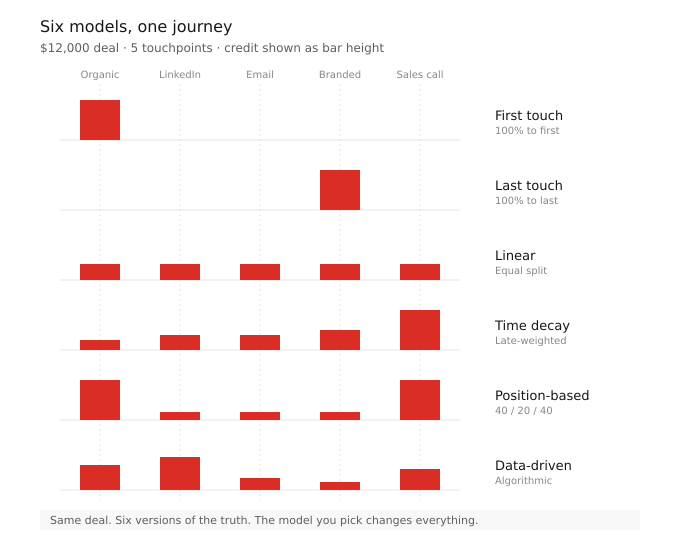
We’ll use the same single customer journey across all six marketing attribution models – so you can see how the different models redistribute credit across one customer journey.
Worked example: A lead from a 40-person SaaS company finds GA Connector via:
- Google organic search → blog post (week 1)
- LinkedIn ad (week 2)
- Email newsletter (week 3)
- Google branded search → demo booking (week 4)
- Sales call → closed-won $12,000 deal (week 5)
1. First touch attribution
How it works: 100% of the credit goes to the first interaction. The first touch attribution model gives all the credit to the very top of the marketing funnel – everything after is invisible.
Worked example: Google organic gets the full $12,000. LinkedIn, email, branded search, and the sales call get $0.
Best for: Brand-awareness focused teams. New product launches where you need to know which channels best introduce the brand. The first touch attribution model usually works best as a complement to a more sophisticated attribution model – not as the source of truth. Use it alongside one that captures both first and last touchpoints.
Watch out for: First touch ignores everything that nurtures the lead after discovery. Optimize purely on first touch attribution data and you’ll starve the channels that close. Top-of-funnel marketing efforts get all the credit; everything else in the buyer journey gets nothing.
2. Last touch attribution
How it works: The last touch attribution model is the opposite of first-touch – 100% of the credit goes to the final touchpoint. Everything before gets ignored.
Worked example: Google branded search → demo booking gets the full $12,000. Organic, LinkedIn, email, and the sales call all get $0.
Best for: Short, transactional sales cycles. E-commerce with impulse purchases. Businesses where one customer interaction genuinely closes most deals. It’s also the default in most ad platforms and GA4 – which is why so many teams use it by accident. (Sometimes called last click attribution; the terms are interchangeable.)
Watch out for: It makes SEO, content, and brand marketing look worthless – even when they did the heavy lifting. Last touch attribution over-rewards retargeting and branded search, both of which usually just close demand other channels created. Any touch attribution model that ignores everything before the final click will distort your attribution reporting and budget decisions.
3. Linear attribution
How it works: The linear attribution model gives every touchpoint equal credit. It’s a straightforward model – credit splits evenly across multiple touchpoints.
Worked example: Each of the five touchpoints gets 20% – that’s $2,400 each, across organic, LinkedIn, email, branded search, and the sales call.
Best for: Teams moving from single-touch to multi-touch for the first time. Businesses where the buyer journey is genuinely balanced across channels. A useful default linear attribution model when you don’t yet have enough data for data-driven.
Watch out for: Treating every touchpoint as equally important is rarely accurate. A throwaway display impression gets the same weight as a 30-minute demo, which… come on. Linear attribution is one of the simpler multi touch attribution models – good as a starting point, not for long-term budget decisions.
4. Time decay attribution
How it works: The time decay attribution model weights credit toward customer interactions closer to conversion. The closing touch might get 40%, the previous one 25%, and so on. Late touches get more credit; earlier touches get less.
Worked example: Applying typical decay (halving with each step back), the sales call gets ~$4,800, branded search ~$2,400, email ~$1,800, LinkedIn ~$1,800, organic ~$1,200.
Best for: Longer sales cycles where late-funnel touches genuinely matter more. B2B SaaS with 3–6 month cycles. Teams running heavy nurture and retargeting where late touches obviously moved the deal forward.
Watch out for: Time decay attribution still under-credits the top of the funnel. If your SEO and content bring leads in at all, time decay attribution makes them look less valuable than they are. Among multi touch attribution models, this is the one that most clearly favors closing channels.
5. Position based attribution (U-shaped / 40-20-40)
How it works: A u shaped model – 40% credit to the first touchpoint, 40% to the last, 20% split across the middle. The position based attribution model acknowledges both demand generation and demand capture, and it’s a popular pick among multi touch attribution models for B2B.
Worked example: Organic search and the sales call each get $4,800 (40% of $12k). The middle three (LinkedIn, email, branded search) share the remaining $2,400 – $800 each.
Best for: Businesses that value demand generation and conversion equally. Moderate B2B sales cycles (4 weeks to 3 months). A common pick for marketing attribution strategies at SMBs.
Watch out for: The 40-20-40 split is, frankly, arbitrary. Some teams customize the weights (e.g., 30-40-30 for longer nurture), creating custom attribution models tuned to their funnel. If you’re customizing the weights, you’re already pretty close to needing data-driven anyway. 6. Data-driven attribution (algorithmic)
How it works: Instead of a fixed rule, machine learning analyzes thousands of actual customer journeys – converting and non-converting – to figure out how much each touchpoint contributes to conversion probability. The algorithm uses signals from real consumer behavior to assign more credit to interactions that statistically correlate with conversion.
Worked example: The model might learn that branded search rarely causes conversions and that the LinkedIn ad early in the journey correlates strongly with closes. Credit redistributes – perhaps LinkedIn $4,000, organic $3,000, sales call $2,500, email $1,500, branded $1,000.
Best for: Businesses with enough conversion volume to actually train a model. GA4’s data-driven attribution requires 300+ conversions and 3,000+ path interactions in 30 days. Complex, multi-channel customer journeys. The best marketing attribution model for high-volume operations.
Watch out for: It’s a black box. Output without reasoning. It requires accurate data and complete tracking to avoid garbage-in, garbage-out. SMBs typically trip up here: ad data lives in GA4, revenue lives in a CRM, and nobody has connected the two. See our data-driven attribution guide.
This is exactly where marketing attribution software earns its keep for SMBs. Data-driven attribution is only as accurate as the data feeding it — and for B2B companies where deals close in a CRM, your attribution layer needs to see both the web journey and closed-won revenue. GA Connector handles that integration: it pushes web touchpoint data onto every CRM lead record and syncs closed-won revenue back into Google Analytics, so attribution reporting reflects dollars, not form fills.
See revenue-level attribution inside your CRM — Start a free trial of GA Connector →
How to choose the right marketing attribution model
Most articles end the model walkthrough with “it depends.” This one won’t.
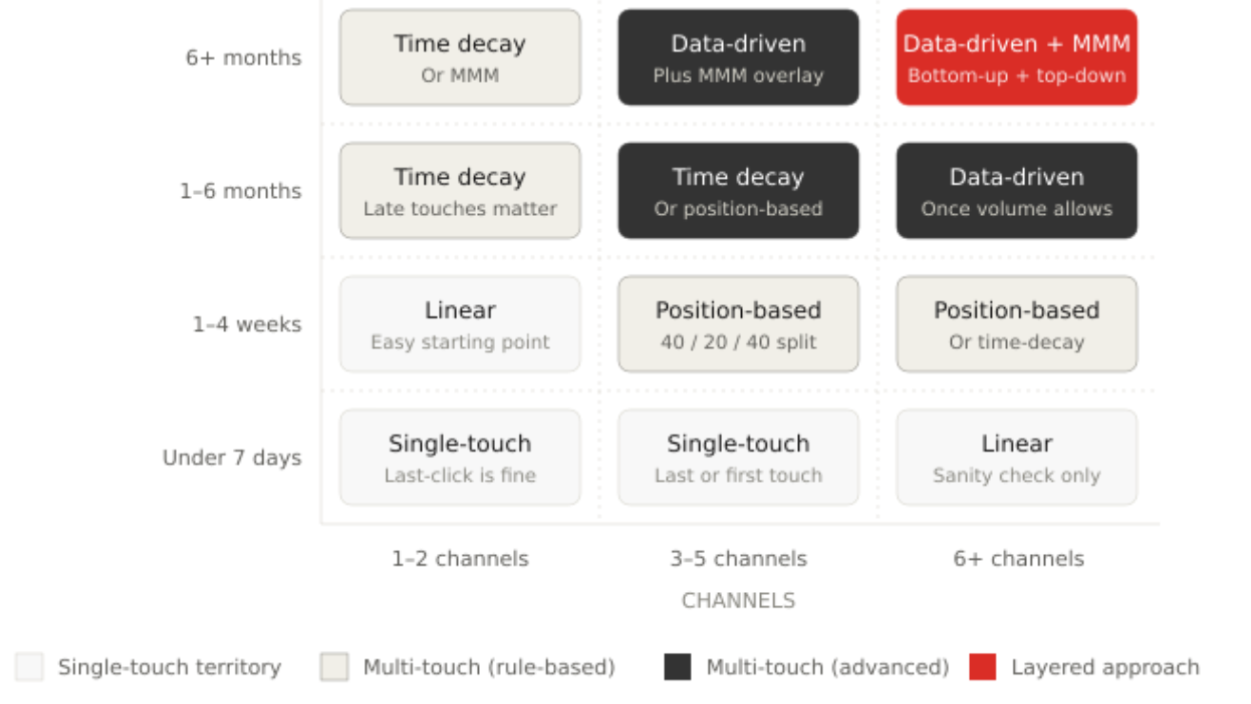
Here’s a decision framework keyed to three variables: sales cycle length, number of marketing channels, and where conversions happen. Use it to match marketing attribution models to your marketing strategy and pick a marketing attribution tool.
1. Sales cycle length
- Under 7 days → Single-touch is defensible. The journey is short enough that one touchpoint really does dominate.
- 1–4 weeks → Linear or position-based. Multi-touch is required, but you don’t need algorithmic sophistication just yet.
- 1–6 months → Time-decay or data-driven. Late-funnel touches matter, but you’ve got to credit the marketing tactics that opened the journey too.
- 6+ months → Data-driven attribution or marketing mix modeling. Longer sales cycles compound complexity fast.
2. Number of marketing channels
- 1–2 channels → Single-touch works. Not much to distribute.
- 3–5 channels → Multi-touch required. Even position-based gives a much truer picture than last-click.
- 6+ different marketing channels with meaningful spend → Data-driven. Rule-based models simply can’t capture interaction effects.
3. Where conversions happen
- Online-only (e-commerce checkout, self-serve signup) → Platform-native attribution plus GA4 is often enough.
- Offline / CRM-closed (B2B, high-ticket, deals on a sales call) → You need a tool that connects web data to CRM data. This is the single biggest fork in the road for SMBs. Capturing online and offline efforts in one view is the desired outcome — the marketing efforts on each side should feed the same picture, and the attribution model should reflect both. Otherwise neither half tells the truth.
Scenario-based lookup
A few common SMB profiles and which marketing attribution models actually fit:
- E-commerce store, $10 AOV, mostly paid social → Last-touch (platform default) is fine. Don’t overthink it.
- B2B SaaS, $15k ACV, 60-day sales cycle, 5 channels, HubSpot CRM → A position-based or time-decay attribution model; data-driven once volume allows. CRM + GA integration is non-negotiable.
- Professional services firm, $50k+ deals, 6-month cycle, lots of referrals → A data-driven attribution model + “how did you hear about us?” survey data. Online and offline efforts need to feed the same picture.
- Marketing agency with 20 clients → Match the attribution model to each client’s business. Position-based as a baseline.
Use multiple attribution models in parallel
Sophisticated marketing teams don’t pick one model and lock in. They run multiple attribution models side by side – typically last-click, position-based, and data-driven – and investigate when models disagree sharply. A channel that looks great in last-click and terrible in first-click is probably just closing demand other channels created.
Use attribution data to triangulate, not to allocate resources from a single source. When the different models agree, trust the signal.
Common attribution mistakes (and how to avoid them)
Here are eight traps SMB marketing teams fall into when working with marketing attribution models. Think of it as the best practices list for building marketing attribution strategies – across the marketing efforts spanning your sales funnel.
Sticking with GA4’s default last-click because it’s the default. Pick a marketing attribution model deliberately and review quarterly. Best practices: review the attribution model you chose every quarter against a second one.
Trusting platform-native attribution. Google Ads, Meta, and LinkedIn each over-credit themselves. Use an independent attribution layer across digital campaigns.
Ignoring offline conversions. If deals close in the CRM and you’re only tracking form fills in GA4, you’re missing the entire revenue side. Connect tracking to your CRM, or accept that your attribution insights stop at the form fill – your lead generation reports won’t tell you which leads turned into revenue, and your marketing strategy will optimize for the wrong things.
Switching models every month. Attribution data and attribution reporting are only comparable over time if the attribution model stays stable. Pick one, live with it for a quarter, then review.
Choosing data-driven before you have the data. GA4 needs 300+ conversions and 3,000+ path interactions in 30 days. Below that, stick with rule-based touch attribution model options – even the most sophisticated marketing attribution tool can’t manufacture accurate attribution from a thin dataset of customer interactions.
Forgetting dark social and self-reported sources. Add a “how did you hear about us?” field to your demo-request forms. It catches touchpoints no tracking marketing software ever will. This zero party data fills attribution gaps you can’t otherwise see.
Treating attribution as a one-time setup. Channel mix changes. Tracking breaks. New marketing campaigns launch. Audit UTMs and tracking quarterly — see our UTM parameters guide.
Making budget decisions from a single attribution model’s output. Cross-check at least two before moving any significant marketing spend.
How to implement attribution (and where GA Connector fits)
Here’s what an SMB attribution stack actually looks like in 2026. Four layers, and each one is a prerequisite for the next.
Layer 1: Tracking
Consistent UTMs across every campaign. GA4 configured with conversion events that map to business outcomes (demo bookings, trial signups, MQLs), not vanity metrics. Server-side tracking where possible.
Layer 2: Storage
GA4 holds web behavior – sessions, source/medium, pageviews. Your CRM (Salesforce, HubSpot, Pipedrive, or Zoho) holds lead records, opportunity stages, and closed-won revenue. These two systems are usually disconnected by default – and that gap is where most SMB marketing attribution dies. The web side knows about clicks; the CRM side knows about dollars. The result is data silos that produce conflicting reports – exactly the Monday-morning dashboard problem we opened this article with.
Layer 3: Integration (the bridge)
This is where GA Connector comes in. It captures first-click and last-click attribution data — source, campaign, medium, keyword, and landing page — and pushes that onto the matching lead record in your CRM. When the lead progresses to closed-won, the revenue flows back into Google Analytics, so attribution reports reflect dollars instead of form fills.
For SMBs using a major CRM, this integration is what separates real attribution from disconnected dashboards. Teams typically go from disconnected to end-to-end attribution reporting in days. Salesforce, HubSpot, Pipedrive, and Zoho are supported natively.
Layer 4: Modeling and reporting
With layers 1–3 in place, you apply your chosen attribution model – inside GA4, Looker Studio, or your CRM’s reporting. Some teams build custom attribution views, including custom attribution models tuned to their marketing funnel and sales funnel stages. With CRM and analytics data unified, attribution reporting finally answers what CFOs ask: “What’s our paid search ROAS based on closed-won revenue, attributed via position-based?” Every marketing activity tied to closed-won dollars.
The integration is the strategic tool here. Without it, even the most sophisticated attribution model is a guess, and your attribution strategies stall.
Use attribution reporting templates to standardize weekly views. Run reports broken down by marketing activity, campaign, and channel.
If you’re on Salesforce, HubSpot, Pipedrive, or Zoho and your GA4 data and CRM data aren’t talking to each other, that’s the cheapest fix for the biggest attribution problem SMBs face. Full stop.
Start your free trial of GA Connector → | Book a demo →
Pick a model, ship it, iterate
Marketing attribution isn’t about finding the one “correct” attribution model. Every attribution model lies a little. The goal is to pick the attribution model that lies least for your business, implement it consistently, and compare it against at least one other attribution model so you can spot when something’s off. Use attribution reporting to triangulate, not to validate a single answer.
Best practices: pick deliberately based on sales cycle and channel mix. Run two attribution models in parallel for sanity-checking. Audit tracking quarterly. Add a self-reported source field to high-intent forms.
If you’re an SMB running multi-channel marketing campaigns on a CRM, your fastest path to real attribution isn’t a new dashboard – it’s connecting the one you already have to your GA4 data.
Start a free trial of GA Connector →
Frequently asked questions
What is marketing attribution in simple terms?
Marketing attribution is figuring out which marketing touchpoints contributed to a sale and assigning credit to each. Instead of saying “Google Ads got the conversion,” attribution looks at the whole buyer journey and decides how much credit each touch deserves based on the marketing attribution model you pick.
What are the 6 main marketing attribution models?
First-touch (100% to the first interaction), last-touch (100% to the last), linear (equal split across every touchpoint), time-decay (more credit closer to conversion), position-based or U-shaped (40/20/40), and data-driven (algorithmic). Each one treats the customer journey differently, with different trade-offs.
What’s the best marketing attribution model for B2B?
For most B2B SMBs with sales cycles of 1–6 months and 3+ active marketing channels, position-based or time decay attribution is a reasonable default. Teams with high conversion volume (300+ conversions and 3,000+ path interactions in 30 days) can graduate to data-driven. B2B attribution is incomplete without connecting CRM to GA4.
What’s the difference between single-touch and multi-touch attribution?
Single-touch (first-touch and last-touch) gives all the credit to one interaction. Multi-touch (linear, time-decay, position-based, data-driven) distributes credit across multiple. Single-touch is simpler; multi touch attribution is more accurate but requires complete tracking and meaningful data volume.
Does GA4 have data-driven attribution, and when does it work well?
Yes. GA4 has a built-in data-driven attribution model that uses machine learning on conversion paths. It works well with at least 300 conversions and 3,000 path interactions in 30 days. Below those thresholds, the signal is unreliable.
How is attribution different from marketing mix modeling (MMM)?
Marketing attribution looks at individual customer journeys and assigns credit at the touchpoint level. MMM uses aggregate data to estimate channel contribution at the portfolio level. Bottom-up vs top-down.
How do I attribute revenue from deals that close offline?
Connect your web analytics (GA4) to your CRM. Source/medium and campaign data captured at lead creation persists onto the CRM record; when the deal closes, revenue flows back into analytics. Tools like GA Connector handle this for major CRMs.
How much does marketing attribution software cost for SMBs?
Enterprise platforms typically start at $1,500/month with multi-month implementations. Integration-focused tools for SMBs (GA Connector and similar) are priced for 11–200 employee companies and implement in days. Free tools like GA4 alone work until you need to connect web behavior to CRM revenue – for B2B, that’s basically immediately.