When marketing teams search for Attributer vs GA Connector, they’re usually trying to solve the same core problem: figuring out which marketing channels actually drive revenue, not just leads. Both tools are marketing attribution software that capture lead source data into your CRM. GA Connector is a closed-loop marketing attribution platform, it tracks all marketing channels into your CRM and pushes deal revenue back into Google Analytics, from first ad click to closed deal. Attributer captures first-touch channel data into hidden form fields. They overlap on the basics and diverge sharply in depth.
There’s something else worth addressing upfront: Attributer’s own founder published a comparison article about GA Connector containing five specific, documented factual errors. We’ll go through each one, then give you an honest look at how the tools actually compare.
Who is GA Connector for?
GA Connector is for B2B companies where deals close offline and revenue — not form fills — is how marketing gets judged. If you have a sales team closing by phone or email, a CRM you’re already running pipeline through, and a genuine need to know which marketing channels produce customers rather than just leads, this is the right tool.

It fits particularly well for:
- B2B companies with longer sales cycles (weeks to 12+ months) where attribution data needs to outlast browser sessions
- Teams on Salesforce, HubSpot, Zoho CRM, or Pipedrive who want closed-won revenue flowing back into GA4 for real ROI reporting
- Marketers running Google Ads, Meta Ads, or LinkedIn Ads who need to see which ad platforms are driving actual customers, not just clicks
- Marketers who need first-click and last-click as dedicated fields on every lead record, plus the full multi-touch path
- Companies with significant paid channel spend who need to know which campaigns drive conversions that actually close
- Revenue ops and marketing ops teams who want a single attribution layer connecting user behavior on the website to CRM pipeline
Who is Attributer for?
Attributer is for businesses that want clean, structured channel data on every lead without a complex integration. If your primary question is “which channel did this lead first come from?” and your sales cycle is short enough that first-touch data is a reasonable revenue proxy, it works well.
It fits particularly well for:
- SMBs and agencies who need reliable channel attribution without heavy integration work
- Transactional or short-cycle businesses where leads convert quickly and first-touch channel reflects actual revenue patterns
- Agencies managing attribution across multiple client sites who need something lightweight and scalable
- Businesses that don’t need CRM-to-GA4 revenue reporting and want simple lead source visibility in their CRM
At a glance
| GA Connector | Attributer | |
| Tracks organic channels (SEO, Social, Referral, Direct) | ✅ Yes — since 2016 | ✅ Yes |
| Captures UTM parameters | ✅ Yes | ✅ Yes |
| Structures channel data (not just raw UTMs) | ✅ Yes | ✅ Yes |
| First-touch attribution | ✅ Yes | ✅ Yes (only model — by design) |
| Last-touch attribution | ✅ Yes | ⚠️ Via workaround only |
| Full multi-touch path on CRM record | ✅ Yes (“All Traffic Sources” field) | ❌ No |
| CRM → GA4 revenue import | ✅ Yes (add-on) | ❌ No |
| Hidden form fields required | ✅ Optional (API method = zero fields) | ✅ 6 fields required |
| Data points captured per lead | 20+ | 6 |
| Long B2B sales cycle support (12+ months) | ✅ Yes | ⚠️ Cookie-dependent (365-day default; limited for Safari users or cycles beyond 12 months) |
| CRM integrations | 40+ | Wide range |
| Infrastructure | AWS EU | Amazon CloudFront |
| GDPR compliant | ✅ Yes | ✅ Yes |
| Customer support | Email + calls included | Email + call scheduling included |
| Starting price | $97/month (50k page views, annual) | $29/month (100 leads/month) |
| Free trial | 30 days, no credit card | 14 days |
Why this article exists
This article on Attributer’s blog was written by Attributer’s founder. It presents itself as an objective comparison.
It isn’t.
It makes factual claims about GA Connector that are verifiably wrong, internally contradictory, and in at least one case self-refuting within the same article.
The five false claims, debunked
Claim 1: GA Connector cannot track organic search, social, referral, or direct

| What the article says | “GA Connector is designed to simply capture raw UTM parameters. If someone arrives from Organic Search, Organic Social, Referral, Direct, etc., you don’t get this information.” |
| The reality | False. We track every traffic source Google Analytics can track — Google Ads, Bing, Facebook, Organic Search, Referral, Social, and more, as per our documentation. |
| The article’s own walk-back | A footnote was added later: “More recently, GA Connector has added a field called ‘Channel’ which does captu re some basic channel information, but it isn’t complete. For example, it doesn’t capture leads that come from Organic Social.” The Channel field isn’t new, and it does cover Organic Social. The footnote is also wrong. |
Claim 2: GA Connector only pulls raw UTM parameters and can’t structure channel data

| What the article says | “GA Connector will literally just pull raw UTM parameters into your CRM, and whatever information you enter in the parameters will directly map to fields in your CRM.” |
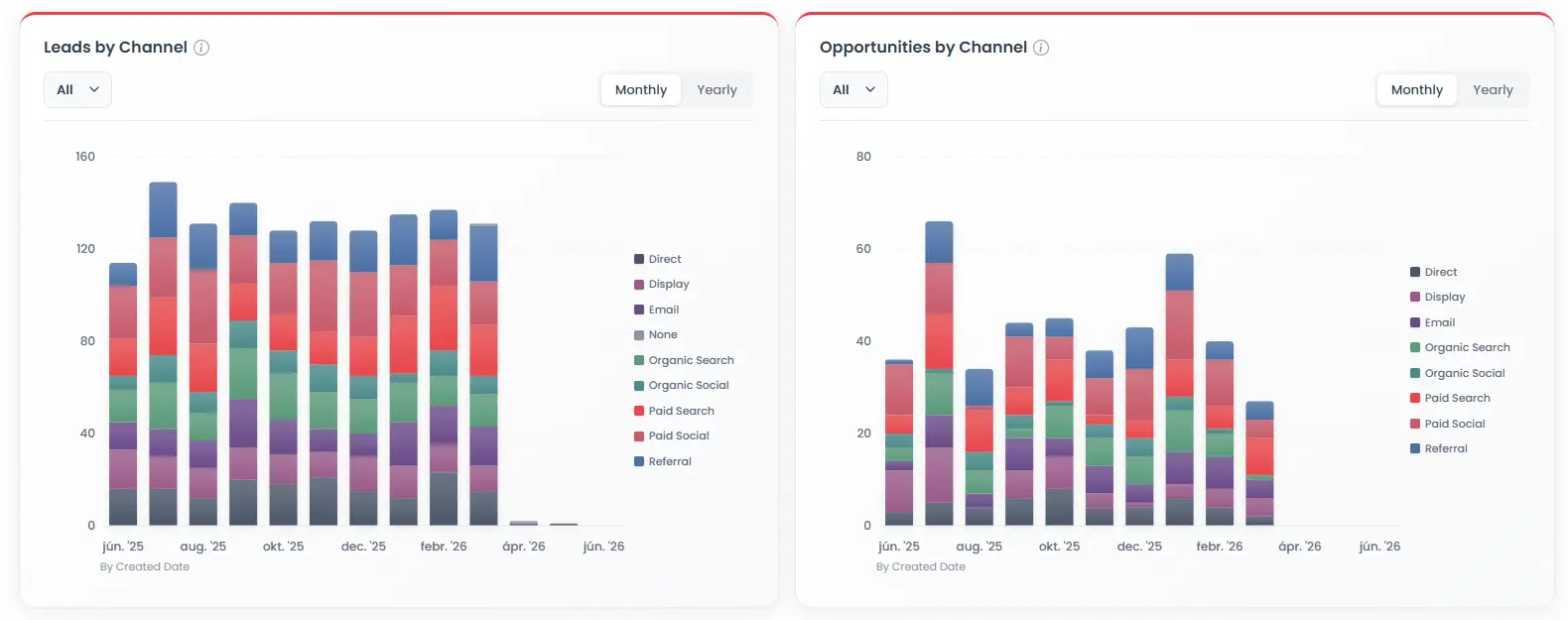
| The reality | False. We use a channel-grouping logic model based on Google Analytics’ own algorithms, assigning structured values like Organic Search, Paid Social, Direct, Referral, and Display based on referrer URL, UTMs, and other signals — not UTMs alone. |
| The internal contradiction | This claim directly contradicts Claim 3 in the same article, which says GA Connector needs 32 hidden fields. Raw UTM pass-through needs 5–6 fields. 32 fields would only make sense if GA Connector were capturing far richer data than “just UTMs.” The article can’t have it both ways. |
Claim 3: GA Connector requires 32 hidden form fields

| What the article says | “To fully install GA Connector, you need to add a whopping 32 hidden fields to your forms.” |
| The reality | False. Our API-based integration requires zero hidden form fields. We match visitors to CRM records via hashed email address — no form changes needed at all. |
| On the cookie-based method | This method does use hidden fields, and the count depends on which data points you choose to capture. “32” isn’t a fixed requirement for any installation path. The more data points you want to track the more fields need to be added to the form. |
| The contradiction | A 32-field install would only be needed to capture the comprehensive data that Claim 1 says GA Connector cannot track. The article argues GA Connector captures too little and is too complex to install. Both can’t be true. |
Claim 4: Call support requires extra payment

| What the article says | “GA Connector offers email support to all customers, but if you need anything beyond that you’ll have to pay for it.” |
| The reality | False. We get on calls with every customer at no extra charge, confirmed by multiple independent Capterra and G2 reviewers. Our longest-tenured support specialist, Ardian, has nearly 8 years at GA Connector and a web development background. He doesn’t point you to docs; he works through your exact CRM and form setup until it’s running correctly. Attributer offers email and chat support only. |
| What the “Done For You” service actually is | A managed white-glove implementation service which is optional. We don’t require this to have a call, any client can book a call with us! |
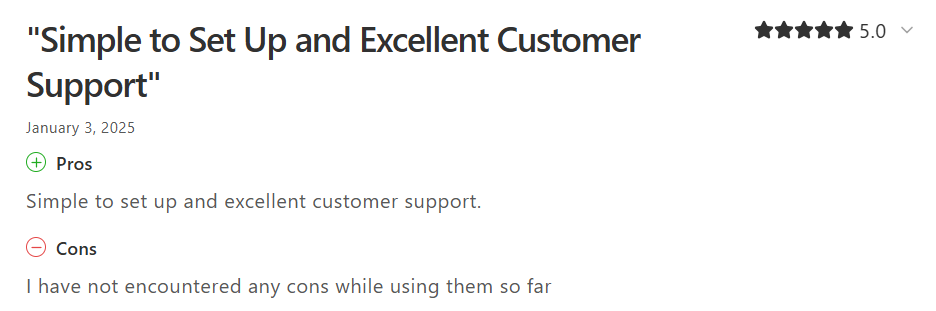
| The ratings | GA Connector holds a 4.9/5 customer service rating on Capterra across 17 verified reviews. 4.7 overall across G2, Capterra, and Salesforce AppExchange. |
Claim 5: GA Connector uses unknown, unreliable servers
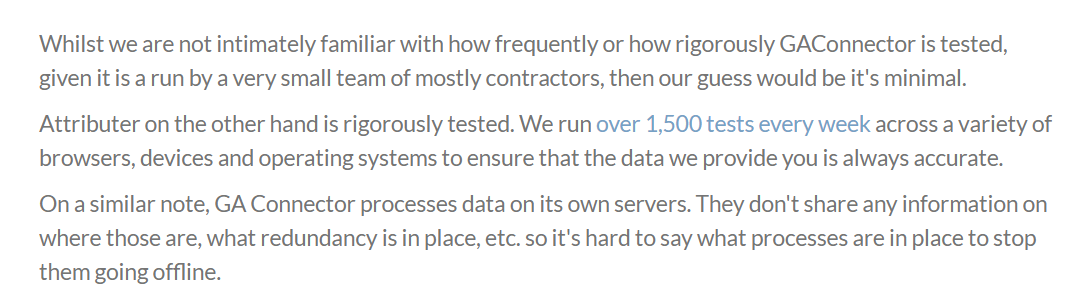
| What the article says | “GA Connector processes data on its own servers. They don’t share any information on where those are, what redundancy is in place, etc.” |
| The reality | Inaccurate. GA Connector runs on Amazon Web Services (AWS), EU region. Documented here, at the same page covering GDPR compliance, data retention modes, and consent management. Every CRM integration is put through a thorough staging test pass across the full sync flow before it ever ships to production. |
| On the speculation about testing | The article adds: “Whilst we are not intimately familiar with how frequently or how rigorously GA Connector is tested, given it is run by a very small team of mostly contractors, then our guess would be it’s minimal.”
Presented as an assessment, based on nothing — the authors admit they aren’t familiar with GA Connector’s testing. In reality, GA Connector has been in production since 2016 (5 years longer than Attributer), trusted by Invisalign, DSV, Fiserv, Bloomberg Second Measure, and Sorenson. Every release goes through Qase-managed test cases and a full staging pass across all supported CRMs, backed by automated unit and E2E tests. All data is hosted on AWS EU, stored as irreversible hashes, and the codebase undergoes quarterly CVE audits. |
The honest comparison
What each tool is actually built to answer
GA Connector: Which marketing channels, campaigns, keywords, and ad platforms are driving revenue — not just leads? It closes the loop between marketing efforts and closed deals, connecting the full customer journey — from first website visit to won opportunity — with revenue flowing back into GA4.
Attributer: Which channel did this lead first come from? It captures and structures first-touch channel data in your CRM for lead volume reporting by source.
Both answer the same question. GA Connector just takes it further, all the way to revenue.
Channel coverage
Both tools track organic and paid traffic. Worth stating plainly given Claim 1.
| Channel Type | GA Connector | Attributer |
| Organic Search | ✅ | ✅ |
| Organic Social | ✅ | ✅ |
| Paid Search | ✅ | ✅ |
| Paid Social | ✅ | ✅ |
| Referral | ✅ | ✅ |
| Direct | ✅ | ✅ |
| Display | ✅ | ✅ |
Data captured per lead
| Data Point | GA Connector | Attributer |
| Channel grouping | ✅ | ✅ |
| Channel drilldown hierarchy | ✅ | ✅ (4 levels) |
| First-touch source / medium | ✅ | ✅ (first-touch only, by design) |
| Last-touch source / medium | ✅ | ⚠️ Via 1-day cookie workaround |
| Campaign name | ✅ (dedicated field) | ✅ (in Drilldown 2 for paid channels) |
| Keyword | ✅ (dedicated field) | ✅ (Drilldown 3; paid always, organic when available) |
| Landing page | ✅ | ✅ |
| Landing page category / group | ✅ | ✅ |
| Referrer URL | ✅ (dedicated field) | ✅ (Drilldown 2 for referral traffic) |
| All Traffic Sources (full sequential path) | ✅ (cookie-based) | ❌ |
| Device type | ✅ | ❌ |
| Geolocation (approximate) | ✅ | ❌ |
| Number of website visits | ✅ (cookie-based) | ❌ |
| Time spent on site | ✅ (cookie-based) | ❌ |
| Pages visited | ✅ (cookie-based) | ❌ |
| GA Client ID / GA Session ID / GCLID | ✅ | ❌ |
| Total data points | 20+ | 6 |
A note on Attributer’s structure: campaign name, keyword, and referrer URL aren’t absent — they sit inside the drilldown fields. GA Connector surfaces these as dedicated named fields. Both capture the data; GA Connector’s field structure makes it easier to query specific dimensions directly in your CRM.
Attribution model
| GA Connector | Attributer | |
| First-touch attribution | ✅ | ✅ (default and only model) |
| Last-touch attribution | ✅ | ⚠️ Possible via 1-day cookie workaround |
| Full multi-touch path on CRM record | ✅ (“All Traffic Sources” — every channel in sequence) | ❌ |
| GA4 multi-model analysis (data-driven, U-shaped, etc.) | ✅ (via CRM → GA4 revenue import) | ❌ |
Attributer is explicitly a first-touch system. The 365-day cookie default preserves first-visit data even if the lead comes back many times before converting. Last-touch requires setting cookie expiry to 1 day — a manual workaround, not a feature.
GA Connector captures both first-touch and last-touch as dedicated fields, plus the full sequential “All Traffic Sources” path for every lead. That marketing data lives on the CRM record permanently, queryable alongside all other customer data your sales team has collected.
This matters more as sales cycles get longer. With first-touch only, a deal that closes after 11 months of nurturing gets credited entirely to the channel that first brought the visitor — ignoring everything that moved them through the funnel. The longer the cycle, the more that single-touch view costs you in misallocated budget. GA Connector’s multi-touch data and GA4 revenue import let you apply any attribution model — last-touch, linear, data-driven — to actual closed revenue, not just lead volume.
The closed loop: CRM → GA4 revenue import
This is the biggest functional gap between the two tools, and the Attributer article doesn’t mention it.
GA Connector moves marketing data in two directions:
- Website → CRM: Visitor source data captured at form submission, written to lead records.
- CRM → GA4: Closed deal revenue, stage transitions, and pipeline data pushed back into Google Analytics — analysable with any attribution model (last-click, first-click, linear, time-decay, data-driven) in GA4’s Exploration and Attribution reports.
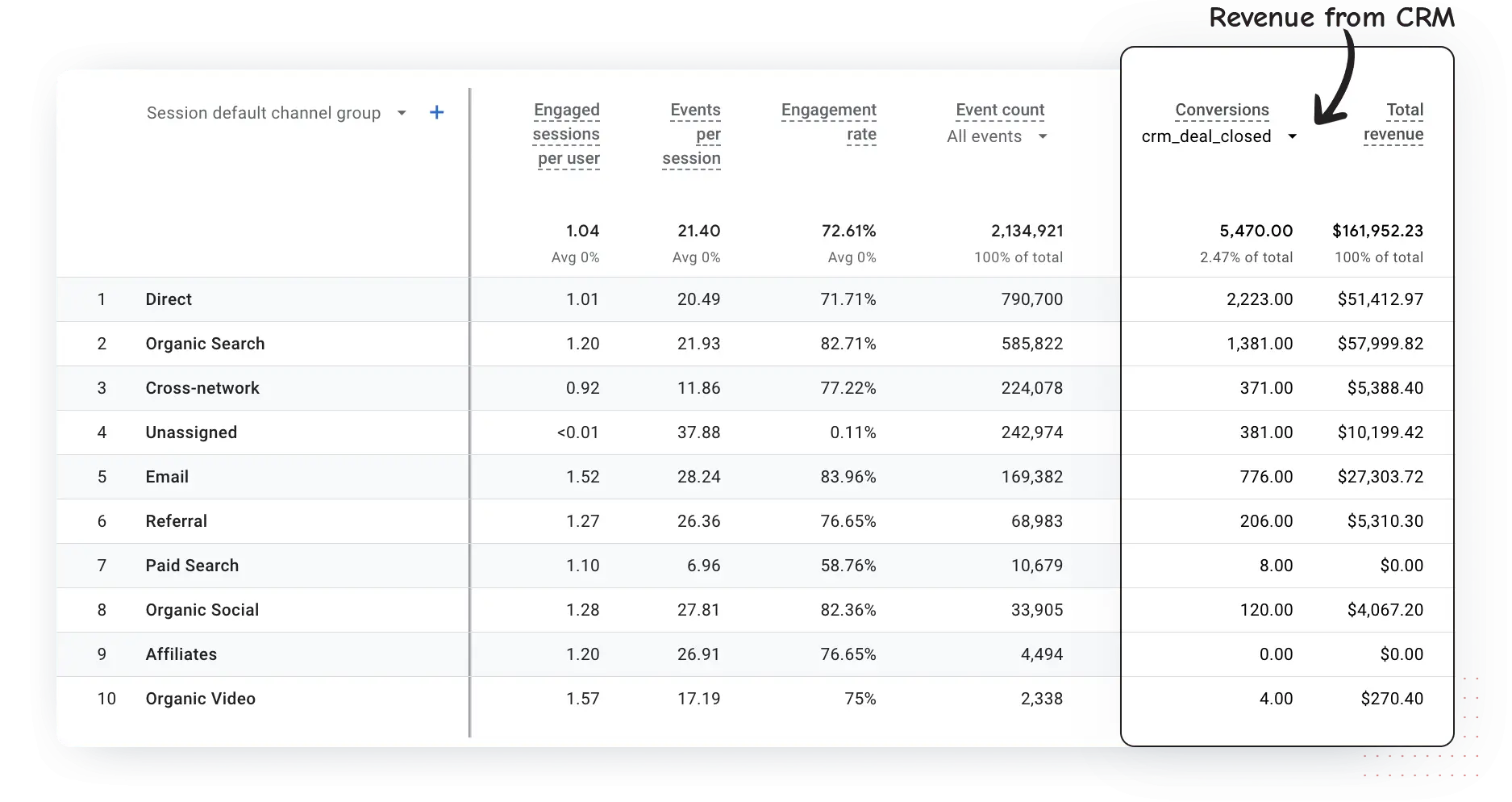
Attributer moves data one way only — website to CRM. No CRM → GA4 flow.
Why this matters: lead volume and revenue are often inversely correlated by channel. A channel generating 40% of your leads may produce 10% of your revenue. Without the closed loop, you’re optimising to a metric that can actively mislead your marketing strategy. According to a RevSure study of 60+ senior B2B marketers, nearly 90% cite siloed systems as a primary attribution barrier. The CRM → GA4 flow is what breaks that.
Installation and setup
| GA Connector (API) | GA Connector (Cookie) | Attributer | |
| Hidden form fields required | ❌ Zero | ✅ Yes | ✅ Yes |
| Form changes needed | ❌ No | ✅ Yes | ✅ Yes |
| Setup complexity | Low | Medium | Medium |
| All Traffic Sources field | ❌ | ✅ | ❌ |
| Data captured | First-click, last-click, UTMs, device, geo, referrer, landing page | First-click, last-click, UTMs, device, geo, referrer, landing page, all traffic sources (every touch in sequence), pages visited, visit count, time on site | First-click channel, campaign, landing page |
Pricing
| GA Connector | Attributer | |
| Entry plan | $97/mo — 50k page views | $29/mo — 100 leads/mo |
| Mid-tier | $197/mo — 125k page views | $49/mo — 500 leads/mo |
| Upper tier | $397/mo — 300k page views | $99/mo — 1,000 leads/mo |
| Enterprise | From $497/mo (custom) | Contact for enterprise |
| CRM → GA4 add-on | +$197/mo | Not available |
| Billing unit | Page views | Form submissions |
| Free trial | 30 days, no credit card | 14 days |
Different billing units mean headline prices don’t translate directly. GA Connector prices by page views; Attributer by form submissions. A high-traffic, low-conversion site will see a very different cost comparison than a low-traffic, high-conversion one. Run your own numbers.
One thing worth noting on value: a team that uses closed-loop attribution to catch one misallocated budget decision — say, $50k of ad spend shifted from a low-ROI channel to a high-ROI one — has already paid for years of GA Connector at any tier.
How to choose
Choose GA Connector if:
- Deals close offline — phone, email, in-person — and you need to connect spend to actual closed revenue
- Your marketing strategy depends on knowing which channels produce customers, not just leads
- Your sales cycle runs longer than 12 months, or your audience is heavily Safari-based
- You’re on Salesforce, HubSpot, Zoho CRM, or Pipedrive and want closed-won revenue inside GA4
- You need first-touch and last-touch as dedicated fields, plus the full multi-touch path, on every CRM lead
- You run Google Ads, Meta Ads, or LinkedIn Ads and want real cost-per-customer by ad platform
- You want GA4’s attribution models running against real CRM revenue data
- You want device type, visit frequency, referrer URL, and time on site on every lead
Choose Attributer if:
- First-touch channel reporting is what you need and deals close within 12 months
- 6 hidden fields, no form rebuilds, done and working
- Lead volume is a reasonable proxy for revenue (transactional, short sales cycle)
- Budget is tight and bidirectional revenue reporting isn’t needed yet
- You manage attribution across multiple client sites and need something lightweight and inexpensive
FAQ
Does GA Connector track organic search traffic?
Yes — since 2016. GA Connector tracks Organic Search, Organic Social, Referral, Direct, Paid Search, Paid Social, and Display using referrer URL signals and GA-style channel-grouping logic. Not just UTM parameters. Any channel Google Analytics can identify, GA Connector can track and attribute to a CRM lead record.
Does GA Connector require hidden form fields?
Not with the API-based integration. Zero form changes required. It matches visitors to CRM records via hashed email addresses. The cookie-based integration uses hidden fields and unlocks a richer data set — but it’s an alternative, not a requirement.
Does Attributer track organic channels too?
Yes. Both tools track organic and paid channels. Despite what Attributer’s own article claims about GA Connector, organic tracking isn’t a differentiator. The real differences are attribution capabilities (first-touch only vs both), data depth, multi-touch paths, and whether CRM revenue flows back into Google Analytics.
Is Attributer a first-touch or last-touch tool?
First-touch by design. Attributer explicitly calls itself a first-touch system. The 365-day cookie default preserves data from the lead’s first visit regardless of how many times they return. Last-touch requires manually setting cookie expiry to 1 day — a workaround, not a feature.
What does GA Connector capture that Attributer doesn’t?
Last-touch attribution as a dedicated field, the full multi-touch sequential path (“All Traffic Sources”), device type, geolocation, visit count, time on site, pages visited, and GA Client ID. Plus closed-won revenue pushed back into GA4. Attributer captures 6 fields: Channel, four drilldown levels, Landing Page, and Landing Page Group — all first-touch.
Can GA Connector handle long B2B sales cycles?
Yes. Attribution data is stored on the CRM lead record at form submission — not in the browser. A deal closing 18 months later still has complete attribution history, regardless of cookie state, device changes, or Safari ITP. Revenue can be sent to GA4 at close regardless of timing.
Is GA Connector GDPR compliant?
Yes. AWS EU infrastructure, first-party cookies only, no-retention mode available, Data Processing Agreement at signup. Full documentation at gaconnector.com/docs/gdpr-and-gaconnector/.
How does pricing compare?
GA Connector starts at $97/month (annual, up to 50k page views), 30-day free trial, no credit card. Attributer starts at $29/month (100 leads/month), 14-day trial. Different billing units — page views vs form submissions — so run your own numbers.
Does GA Connector work with my CRM?
GA Connector works with 40+ CRM software platforms. Deepest integrations: Salesforce (Classic + Lightning), HubSpot, Zoho CRM, Pipedrive, Microsoft Dynamics. CRM → GA4 revenue import available for Salesforce, HubSpot, Pipedrive, and Zoho CRM. Any CRM that supports custom fields can work with GA Connector.
Why does the Attributer article contain false claims about GA Connector?
We don’t know what the author intended. The article contains five verifiable factual errors — on organic channel tracking, data structuring, form field requirements, support access, and infrastructure. Several contradict other claims within the same article. Verify specific capability claims directly with each vendor before deciding.