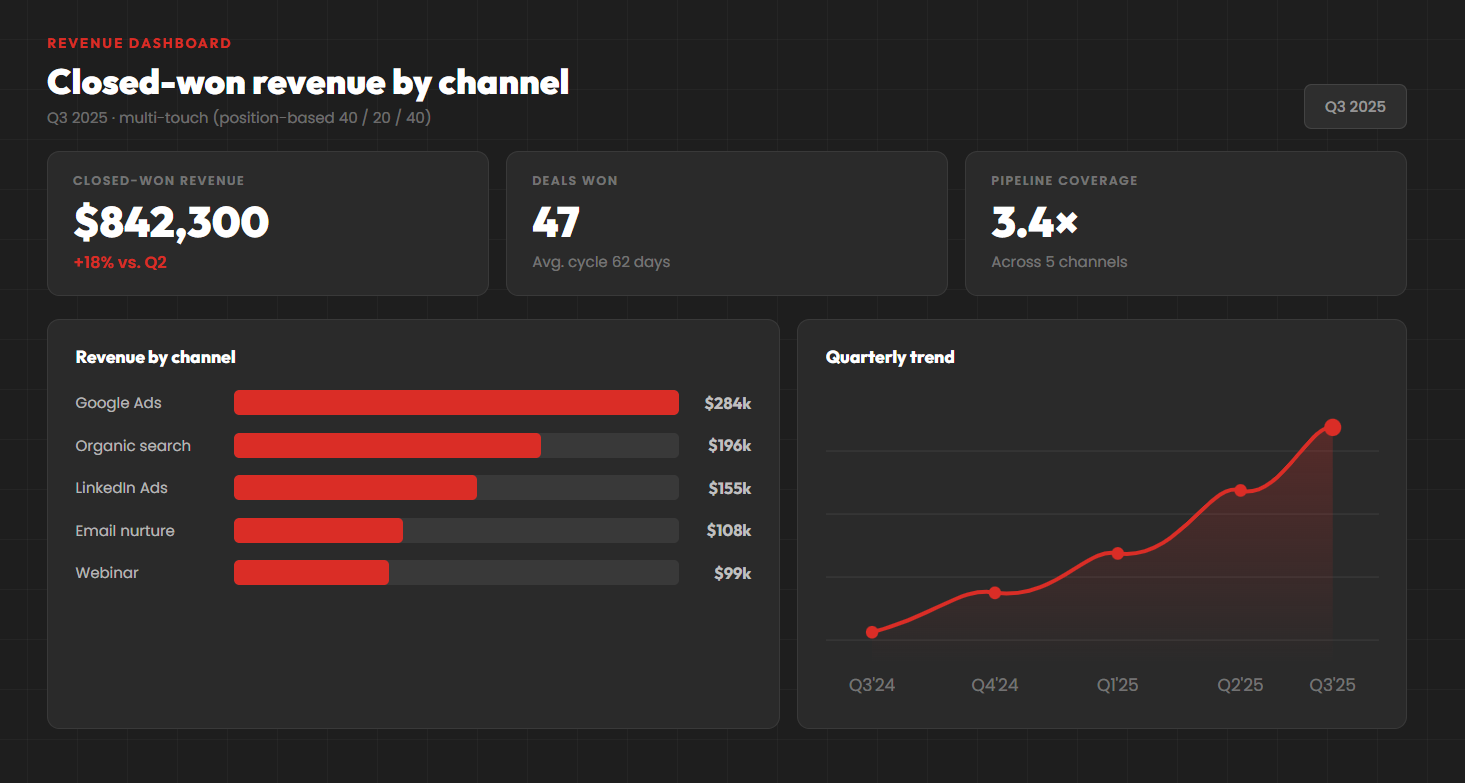
It’s a Tuesday morning QBR and a marketing director is defending a $50k/month Google Ads spend. She pulls up a Salesforce report: 100 closed-won deals last quarter – 60 tagged “Web,” 40 tagged “Other.” Primary Campaign Source is filled in for some Opportunities and blank for others. She can’t point to a single campaign or keyword that drove a specific deal.
Here’s the thing – this is way more common than the Salesforce documentation suggests. Most teams running Salesforce have some version of this story: marketing analytics looks fine on paper, but nobody actually trusts the marketing ROI.
In this guide, we’ll cover what Salesforce does natively for marketing attribution – Lead Source, Primary Campaign Source, Campaign Influence 1.0, Customizable Campaign Influence and Einstein. We’ll walk through how to set up UTM tracking that survives Lead conversion, how Salesforce attribution flows from anonymous visit to closed-won, where every native option breaks, and how to assemble a real multi touch attribution view of the customer journey. Plus an implementation plan and a build-vs-buy framework at the end.
What is Salesforce marketing attribution?
Salesforce marketing attribution is the practice of tying every marketing touchpoint – marketing campaigns, ads, content, channels – to a Lead, then following that Lead through Contact, Opportunity, and closed-won so you can answer one question: which marketing investment actually drove revenue?
Two things make it different from web analytics. First, it spans multiple objects: Lead, Contact, Opportunity, Campaign, Campaign Member, and Campaign Influence. The data model is deeper than most CRMs.
Second, it’s identity-first. Where GA4 tracks anonymous sessions, Salesforce attribution is tied to a named person. That’s what makes Salesforce the source of truth for B2B revenue, and why connecting anonymous web behavior to identified records is the central challenge.
Three things have to be true for it to work end to end: web touchpoints get captured on the Lead, Leads get associated to the right Campaigns as Members, and Opportunities have Contact Roles filled in. Break any one and attribution breaks.
Native Salesforce attribution: your five options
Salesforce gives you five native paths for marketing attribution. Each one solves a slice of the problem. Each one has a failure mode worth knowing before you bet on it.
| Mechanism | Attribution model | Setup | Data entry | Edition |
| Lead Source field | Single-touch | Low | Manual | All |
| Primary Campaign Source | Single-touch (last) | Low | Semi-automatic | All |
| Campaign Influence 1.0 | Single-touch revenue | Medium | Manual | Classic only |
| Customizable Campaign Influence | Multi-touch | High | Semi-automatic | Pro+ |
| Einstein / Opportunity Influence | Data-driven multi-touch | High | Automatic (clean data) | Higher tiers |
1. Lead Source field
The classic Lead.LeadSource and Contact.LeadSource – a picklist with 8–15 standard values like Web, Phone Inquiry, Partner Referral, Other. Ships with every edition.
It’s good for exactly one job: rough percentage questions like “what share of pipeline comes from inbound web vs. referrals?”
What it can’t do is anything channel-specific. “Web” lumps organic search, paid search, paid social, email, retargeting, and direct traffic into one happy bucket. If your decisions live below that level – and any real marketing investment does – you need more.
2. Primary Campaign Source
A field on the Opportunity (Opportunity.CampaignId) pointing to one Campaign as the deal source. When a Lead converts and was a Member of a Campaign, that Campaign typically becomes the Primary Campaign Source.
Works on every edition. Easy to report on. Basically last touch attribution – one Campaign per Opportunity gets the credit.
So picture a $50k deal touched by 14 marketing campaigns over six months – Google Ads, webinars, retargeting, the works – and you keep one. The other 13 get nothing. A long sales cycle is the norm in B2B; for any long sales cycle, single-touch models miss the picture entirely. The right model for those funnels is multi-touch – typically a position based weighting.
3. Campaign Influence 1.0
The legacy multi-touch feature. It uses Primary Campaign Source plus additional Campaign associations, so you see every marketing touch that hit an Opportunity. But here’s the trap – 100% of the revenue still flows to the Primary. So it’s closer to first touch attribution or last-touch than real multi touch attribution.
Also worth knowing: the legacy version isn’t supported in Lightning. So this is borrowed time anyway.
4. Customizable Campaign Influence
The modern multi touch attribution model – and what most “Salesforce multi-touch attribution” articles are actually talking about. You associate multiple campaigns with an Opportunity and split revenue credit using an attribution model – first-touch, last-touch, even distribution attribution (linear), time decay, or a custom attribution model. Conversion rates by stage finally start making sense.
This is real multi touch attribution inside Salesforce, with Campaign Influence reports built around it. So why doesn’t every team have it dialed in? According to Salesforce Ben, nearly 70% of teams cite manual processes as a significant barrier to accurate attribution.
The feature assumes every meaningful touchpoint already exists as a Campaign, with the Lead or Contact added as a Member. For a team running Google Ads across hundreds of keywords, doing that by hand isn’t realistic. (And nobody on your team is volunteering for it.)
5. Einstein Attribution and Opportunity Influence
Salesforce’s AI-powered layer – the closest native option to a sophisticated attribution model. Einstein distributes credit across campaigns using machine learning, surfacing hidden patterns a human wouldn’t catch. Opportunity Influence broadens the touchpoint types it considers.
Einstein is the least manual of the native options – once it has data. It’s also the most edition-restricted, so check the current requirements before betting on it.
The catch is the usual one: garbage in, garbage out. If your Members and Contact Roles are incomplete, the model gets confused.
Takeaway: Every native option is a reporting framework. It assumes the data is clean. Salesforce doesn’t capture that data for you. Without a tool designed for the capture side, most SMB attribution projects stall.
Salesforce UTM tracking: capturing source data on every Lead
UTM tracking in Salesforce really means one thing: capturing the five UTM parameters – utm_source, utm_medium, utm_campaign, utm_term, utm_content – from inbound URLs and writing those UTM parameters to fields on the Lead.
Sounds simple. The native DIY version is. Create UTM fields on Lead (and ideally Contact and Opportunity). Add hidden inputs to your web-to-lead forms. A small JavaScript snippet grabs the UTM parameters from the URL into those inputs at submission. Salesforce has docs on web-to-lead forms if you want to wire it yourself.
It works. And then three problems show up almost immediately.
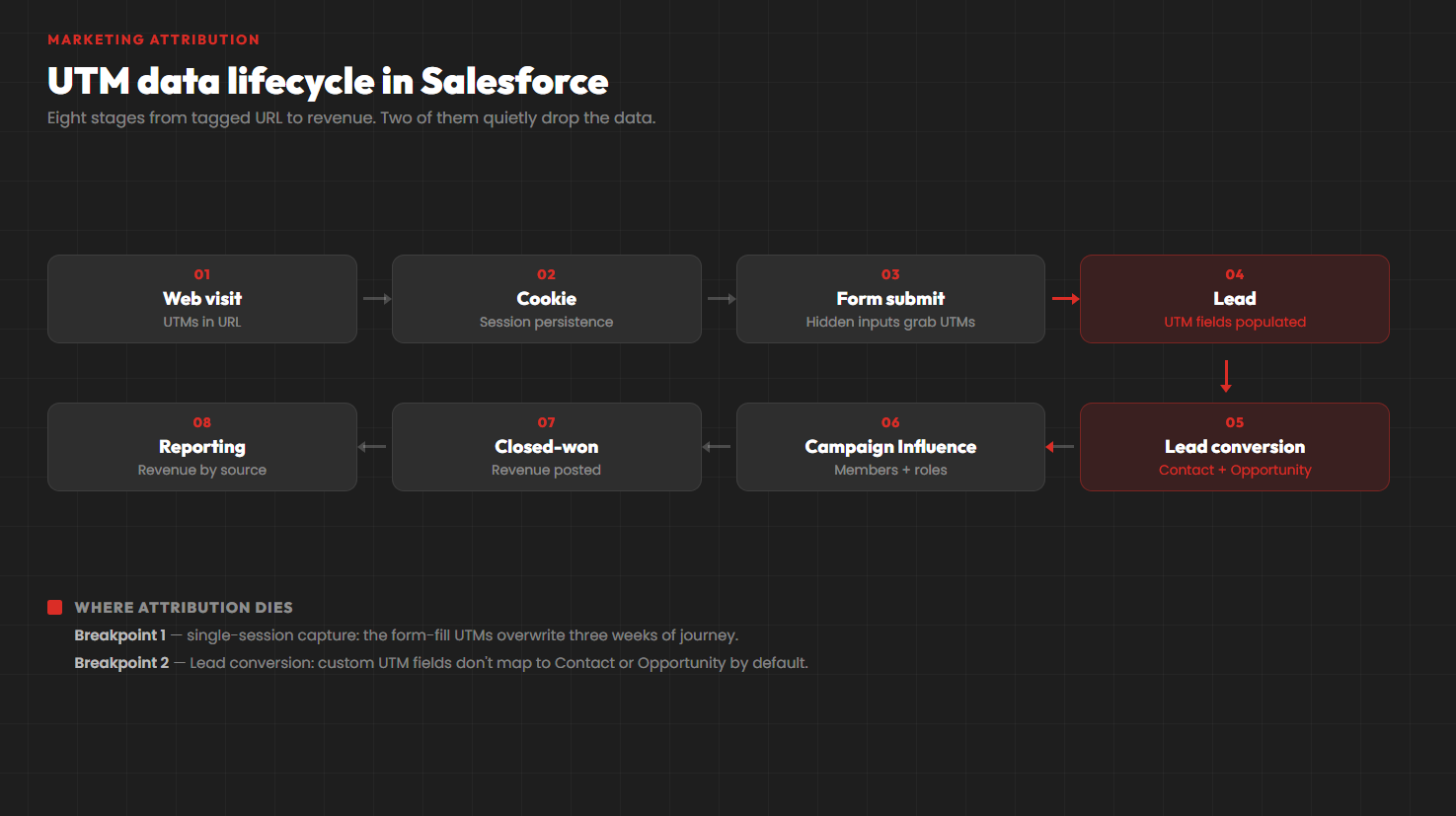
Problem 1 – single-session capture. Most DIY setups grab UTMs only from the form fill where the conversion happens. So a prospect who first arrived from a Google Ad three weeks ago, came back twice via organic search across multiple devices, then converted on a retargeting click gets attributed to retargeting. Last-click hidden inside a “multi-touch” reputation. Cross-session persistence requires a cookie or session ID layer that DIY builds skip.
Problem 2 – Lead conversion drops the data. When a Lead converts, only standard fields map automatically. Custom UTM data doesn’t follow unless you configure Lead-to-Contact mapping in Setup and write logic (a Flow, an Apex trigger, or a tool) to copy it onto the Opportunity. A lot of marketers discover this when their first attribution report shows half their Opportunities with blank UTM data. The form submissions look fine in marketing analytics; the Salesforce data is empty.
Problem 3 – maintenance. Every form-platform change or website redesign means another look at the capture script. Each new marketing activity you launch needs its UTMs baked in from the start. Forever.
This is where GA Connector can help – UTM capture, cross-session persistence, Lead-conversion mapping, and reporting, installed from the AppExchange and usually live the same day. Or you can wire it yourself with our step-by-step UTM parameters guide. Either way, you’ll see how every channel that drove pipeline – content marketing, paid, organic performs, and which channels really drive traffic worth paying for.
Salesforce lead attribution: from first touch to closed-won
UTMs are the mechanic. Salesforce lead attribution is what happens once you have them – a touch’s journey through Salesforce objects, including offline touchpoints. Five stages, each with a failure mode. The goal: pulling all the marketing touches together into one story.
- Anonymous web visit. No Salesforce record yet. Visitor has UTM data (if they came from a tagged URL) plus a cookie or session ID.
- Lead creation. Form fill happens. Salesforce creates a Lead. Whatever you captured before submission lands on the Lead’s UTM fields. Lead Source – and sometimes Primary Campaign Source.
- Lead nurturing as a Member. As the Lead engages with marketing activity – opens an email, attends a webinar, clicks a LinkedIn Ads spot – they should be added as a Member on the relevant campaigns. Each Membership becomes one of the marketing touchpoints the multi touch attribution model can later use to assign credit. This is where you start to see the problem. Manual Member management isn’t a job anyone wants, and when it’s nobody’s job – when it sits between the sales team and marketing – it doesn’t get done.
- Lead conversion. Lead becomes Contact + Opportunity. Standard fields like LeadSource map to Contact automatically. Custom UTM data doesn’t, unless you configured the mapping. Second-most-common place attribution data quietly disappears.
- Opportunity close. Contact Roles link the right Contacts. Influence records connect campaigns to revenue. Reports now show closed-won by Campaign, channel, and – if UTMs are set up properly – keyword.
Each step is solvable in native Salesforce. The hard part is that all five have to work consistently.
For most SMBs, maintaining all five steps manually isn’t realistic for very long. That’s the full-funnel attribution gap sales and marketing teams keep running into.
Try this: Start your free trial of GA Connector and see every Lead’s full attribution path — first click to closed-won — without managing Campaign Members by hand.
Why most Salesforce attribution projects stall
Six common failure modes.
Manual Member management isn’t sustainable. The biggest killer. Customizable Campaign Influence is mathematically elegant and operationally brutal for teams running 50+ active campaigns without dedicated headcount.
UTM data disappears at Lead conversion. Your Lead has beautiful UTM fields. The Contact and Opportunity it converts into don’t, unless you configured the mapping.
Single-session UTM capture misses the journey. Last-click systematically under-credits awareness. The blog post that started a 90-day buying journey gets nothing; the retargeting ad on day 89 gets everything.
Contact Roles on Opportunities are inconsistent. Customizable Campaign Influence depends on them. Many sales reps skip the step. Without a Contact Role, the Campaign Member can’t link to the Opportunity, and the Campaign can’t be credited.
Lead Source picklist sprawl. Eight clean values becomes fourteen “Other” entries, three legacy values nobody recognizes, and two duplicates with different capitalization. Every Salesforce org has this. Every one.
Edition gates on the AI tools. Einstein and parts of Account Engagement (Pardot) – the marketing platform side – sit behind higher-tier bundles. A lot of SMBs on Salesforce Enterprise just don’t have access.
The common thread? Every one of these is a data quality problem. Salesforce’s reports work fine. What breaks is feeding clean data in.
How to implement attribution in Salesforce: a practical plan
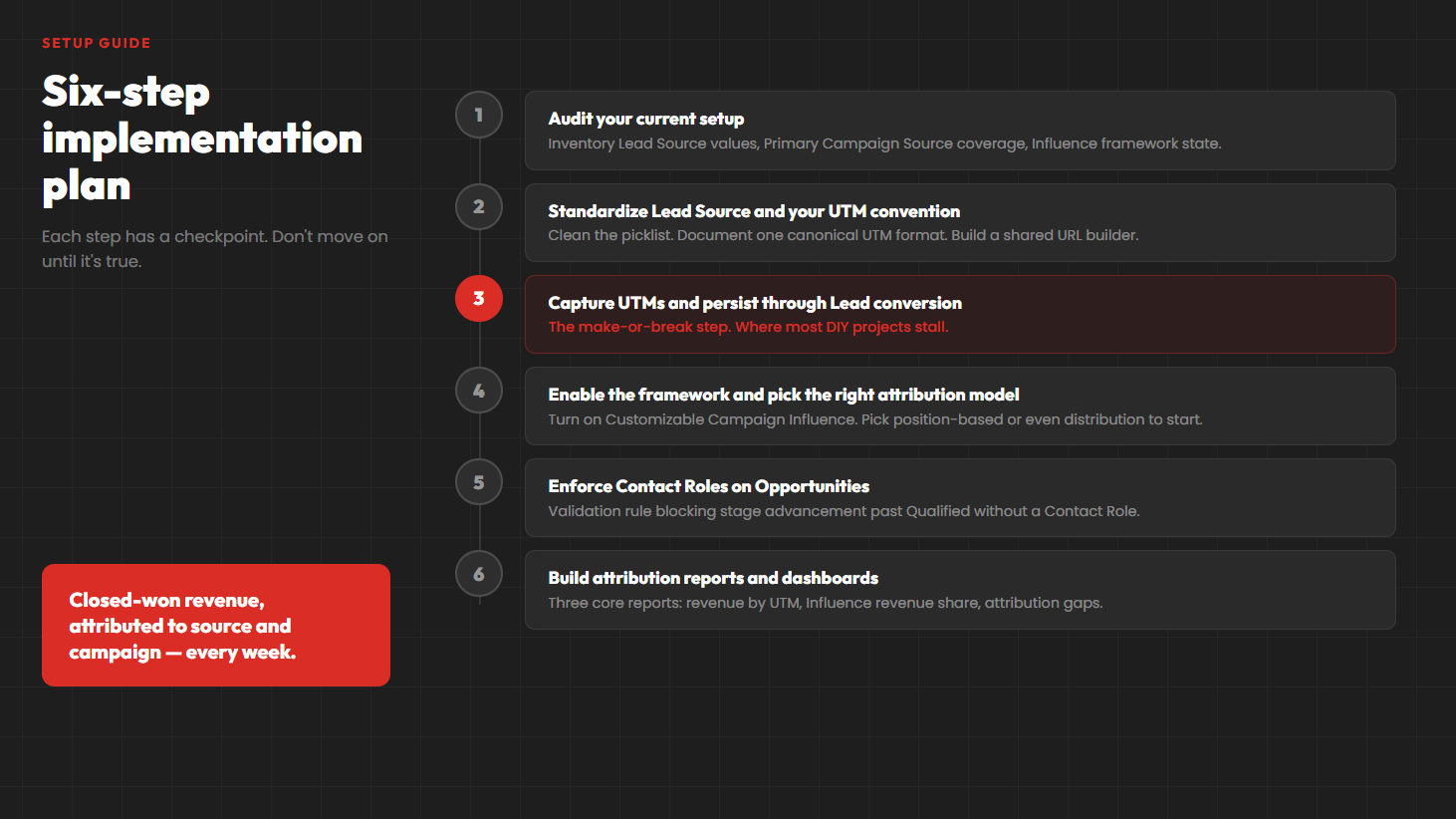
A six-step plan with checkpoints.
Step 1 – Audit your current setup
Inventory what’s already there. Which Lead Source values are actually in use? Is Primary Campaign Source populated on historical Opportunities? Is Campaign Influence enabled and feeding any reports? How is attribution data flowing into your marketing analytics today?
The audit usually turns up something less dramatic than “we don’t track attribution” and more like “we have fragments that don’t add up to a complete picture.”
Done looks like: A doc listing what’s captured, on which fields, and what’s missing.
Step 2 – Standardize Lead Source and your UTM convention
Clean the picklist. Document the canonical list – Organic Search, Paid Search, Paid Social, Email, Referral, Event, Partner, Other – and disable the rest. Pick a UTM naming convention. Build a shared URL builder. Lowercase, no spaces, consistent separators.
Teams that skip this step always regret it. Renaming UTMs six months later is genuinely painful.
Done looks like: A documented UTM convention and a cleaned picklist your marketing team actually uses.
Step 3 – Capture UTMs on the Lead and persist them through conversion
Create custom fields on Lead, Contact, and Opportunity for each UTM parameter (UTM_Source__c, UTM_Medium__c, UTM_Campaign__c, UTM_Term__c, UTM_Content__c). Add hidden inputs to your web-to-lead forms. Configure Lead-to-Contact mapping in Setup. Build cross-session cookie logic so first-touch data survives multi-visit journeys.
This is where DIY projects most often stall. If you’re 30 hours in and your Lead-to-Opportunity mapping still doesn’t handle Custom Object scenarios – or every edge case requires additional configuration – that’s the signal to evaluate a tool instead.
Done looks like: Every new Lead has UTM data populated, persisting through conversion.
Skip the build — install GA Connector from the Salesforce AppExchange →
Step 4 – Enable Campaign Influence and pick the right attribution model
In Setup, enable Customizable Campaign Influence – Salesforce’s help docs walk you through the configuration. Pick a built-in model (first-touch, last-touch, even distribution, time decay) or a custom weighted one.
For B2B SMBs with sales cycles over a month, even distribution attribution or a position based model (40/20/40) is a reasonable place to start. Our marketing attribution pillar has the full comparison.
Run a comparison alongside whatever you pick. Attribution math is opinionated, and you want to see what the disagreement looks like.
Done looks like: Campaign Influence enabled, primary model selected, comparison running.
Step 5 – Enforce Contact Roles on Opportunities
Campaign Influence depends on Contact Roles. No Contact Role, no link from Member to Opportunity, no credit. And – surprise – most reps will skip the step.
Build a validation rule blocking Opportunity stage advancement past “Qualified” without a Contact Role. That eliminates one of the most common SMB attribution failure modes in one move. Pair it with a monthly audit to catch anything that slipped through.
Done looks like: Validation rule live, team trained, monthly audit running.
Step 6 – Build attribution reports and dashboards
Build three core reports. First: closed-won revenue by UTM source / medium / campaign – showing whether Google Ads, organic, or email is actually delivering.
Second: Campaign Influence revenue share by Campaign Type.
Third: Opportunities without Primary Campaign Source – your “attribution gaps” report.
Combine them into a marketing attribution dashboard for a comprehensive view of the specific touchpoints driving pipeline. Share it with sales and exec leadership. Attribution data drives informed decisions only when somebody actually looks at it.
Done looks like: Three reports, one dashboard, reviewed weekly.
Your options for Salesforce attribution: native, DIY, or a tool
Three options for marketers, plus enterprise. Pick what matches your team size, edition, and bandwidth.
| Approach | Setup | Maintenance | Cost | Best for |
| Native Salesforce + manual process | Days | High | In-license | Teams with dedicated RevOps headcount |
| DIY UTM capture + native Influence | 40-80 hrs build | Medium-high | Dev time | Teams with Salesforce dev resources |
| GA Connector | Hours to a few days | Low | From ~$97/mo | SMBs without dedicated attribution headcount |
| Enterprise platforms (Marketo Measure, etc.) | Weeks to months | Medium | $1,500+/mo | 500+ employee enterprises |
Native Salesforce + manual process
Free beyond your existing licenses. No extra cost beyond RevOps time. Works for simple funnels with a RevOps person to maintain Members, Contact Roles, campaign hierarchy, and UTM mappings. Breaks down somewhere around 3-4 channels or 50+ campaigns per month.
DIY UTM capture + native Campaign Influence
Build your own UTM capture, cookie persistence, and Lead-conversion mapping. Initial build: 40-80 hours of dev time. Maintenance kicks in whenever Salesforce ships a release or you change form platforms. Right answer if you have Salesforce dev resources to maintain your Salesforce data.
GA Connector
Installs from the Salesforce AppExchange. Captures UTMs automatically (with cross-session persistence), writes first-click and last-click source data to every Lead, handles Lead-conversion mapping, and ships with pre-built reports and dashboards. Built for marketers and SMB teams without dedicated developer headcount. Works alongside Marketing Cloud or Account Engagement, though Marketing Cloud isn’t a prerequisite. Most customers go from install to useful data in hours or days. (See our Bizible-alternative deep dive if you’re comparing.)
Enterprise attribution platforms
Adobe Marketo Measure (formerly Bizible) and similar. Built for organizations with very complex needs. Pricing starts at $1,500+/month, and implementations frequently take months. Right fit for 500+ employee organizations with dedicated attribution teams.
The right choice depends on edition, team size, and how much time you want your marketing-ops person spending on data plumbing. Demand Gen Report’s 2024 Marketing Measurement & Attribution Benchmark Survey found 86% of B2B practitioners now treat measurement and attribution as a growing priority – which is the polite way of saying your CFO is going to ask soon.
Start your free trial of GA Connector | Book a demo
Attribution in Salesforce is a data problem, not a reporting problem
Salesforce gives you everything you need for real attribution – Customizable Campaign Influence, Einstein, rich reports. What it doesn’t do on its own is capture the touchpoint data those reports need.
That data capture problem is where every SMB Salesforce attribution project either succeeds or quietly dies. Solve it – through automated UTM persistence, Lead-conversion field mapping, and reliable Contact Role workflows – and the reporting takes care of itself.
For SMBs on Salesforce, GA Connector is the shortest path from “we don’t really have attribution” to “we run closed-won revenue reports by source and campaign every week.” The AppExchange install takes a few hours and works alongside whatever Campaign Influence setup you already have.
Start your free trial of GA Connector →
FAQs
What is Salesforce attribution?
Connecting marketing touchpoints – campaigns, ads, channels, content, keywords – to Leads, Contacts, and Opportunities so you can measure which efforts actually drive closed-won revenue. Uses native objects (Lead, Campaign, Member, Opportunity) plus features like Customizable Campaign Influence to assign credit across the customer journey.
What’s the difference between Primary Campaign Source and Campaign Influence?
Primary Campaign Source is one field on the Opportunity pointing to one Campaign – last touch attribution by default, 100% credit. Customizable Campaign Influence is a multi touch attribution model that splits revenue credit across multiple campaigns using your chosen weighting (first-touch, last-touch, even distribution, time decay, custom).
How do I set up UTM tracking in Salesforce?
Create custom UTM fields on Lead, Contact, and Opportunity. Add hidden inputs to your web-to-lead forms that capture UTMs from the URL via JavaScript. Configure Lead-to-Contact mapping in Setup so the data persists. For full cross-session capture, build cookie logic yourself or use a tool like GA Connector.
Does Salesforce Lead Source persist after Lead conversion?
Yes – Lead.LeadSource is a standard field, mapping automatically to Contact.LeadSource and the Opportunity. Custom fields (including UTM data) don’t. Configure Lead-to-Contact mapping in Setup, plus separate logic if you want UTM data on the Opportunity.
What’s the best attribution model for Customizable Campaign Influence?
For B2B SMBs with sales cycles over a month, a position based model (40/20/40) is a reasonable default. Even distribution attribution is fine if you’re new to multi-touch. Run a comparison alongside whatever you pick.
Is Einstein Attribution available on Salesforce Enterprise edition?
Historically, Einstein and Einstein for Sales required higher-tier bundles than base Enterprise. Edition requirements have shifted – check Salesforce’s current pricing or talk to your account exec.
How do I attribute closed-won revenue to a specific Google Ads keyword?
Three things have to be in place: UTMs on every paid Google Ads click (auto-tagging plus manual utm_term), capture on the Lead, persistence through Lead conversion. Then build a report grouped by Opportunity.UTM_Term__c showing closed-won amount by keyword. Same approach works for paid social, LinkedIn Ads, Meta Ads, and inbound phone calls (with call-tracking). See our Google Ads ROI tracking guide for the full keyword-to-revenue setup.
What’s the cheapest way to get multi touch attribution in Salesforce?
Two paths: native Customizable Campaign Influence (free with Pro+ editions, requires manual Member management) or a dedicated SMB tool like GA Connector (~$97/month, automates the data capture). Enterprise platforms like Adobe Marketo Measure are far more expensive and better suited to 500+ employee companies.